Contents
Chapter 5 · NetworkPractice

LEARN WITH HARU

Video Lesson တွေက Haru အတန်းသားတွေအတွက်ပါ

Haru ရဲ့ ITPEC FE Full Course မှာ ယခု သင်ခန်းစာတွေကို တစ်ခုချင်း တစ်ကြောင်းချင်း အသေးစိတ်ရှင််ရှင်းပြထားပါတယ်

အခြေခံ မရှိတဲ့ ကျောင်းသားများစွာဟာလည်း ဒီ Course နဲ့ ပဲ အောင်မြင်ကုန်ကြပါပြီ

အတန်းမအပ်သေးပဲ Haru ဆီမှာ အစမ်းသင်ကြည့်ချင်ပါသလား?

သင်တန်းသားတွေရဲ့ စကားသံများ

သင်တန်းသားတွေရဲ့ စကားသံများ

Highlighted text? Practice this concept. Highlighted passages and figures open related questions.

Practice related questions (6)Progress & bookmarks

Current section

3 LAN

p. 319

Practice this section 6 linked exam questions with default filters

Progress

Not marked complete

Related questions in this lesson 1

10BASE5 notation1
Progress and bookmarks

p. 319

3 LAN

LAN (Local Area Network) is a network that is set up in a narrow area (or premise). This section provides an insight into the devices and techniques that are used to construct a LAN.

3 - 1 Basic Techniques of a LAN

A LAN is constructed by connecting the computers and peripheral equipment in a company and premise with a private line. The construction of a LAN has the following merits.
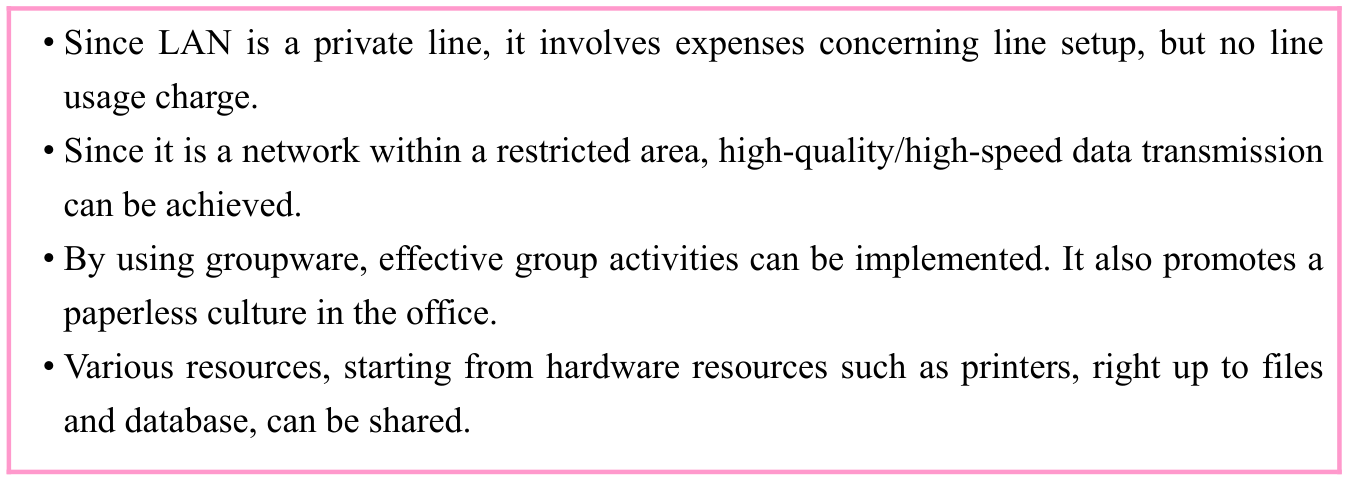
Original Basic Techniques of a LAN source table or explanation box, preserving its complete original arrangement, labels and values. Source text: • Since LAN is a private line, it involves expenses concerning line setup, but no line usage charge. • Since it is a network within a restricted area, high-quality/high-speed data transmission can be achieved. • By using groupware, effective group activities can be implemented. It also promotes a paperless culture in the office. • Various resources, starting from hardware resources such as printers, right up to files and database, can be shared.
p. 319 · Enlarge

(1) Wired LAN

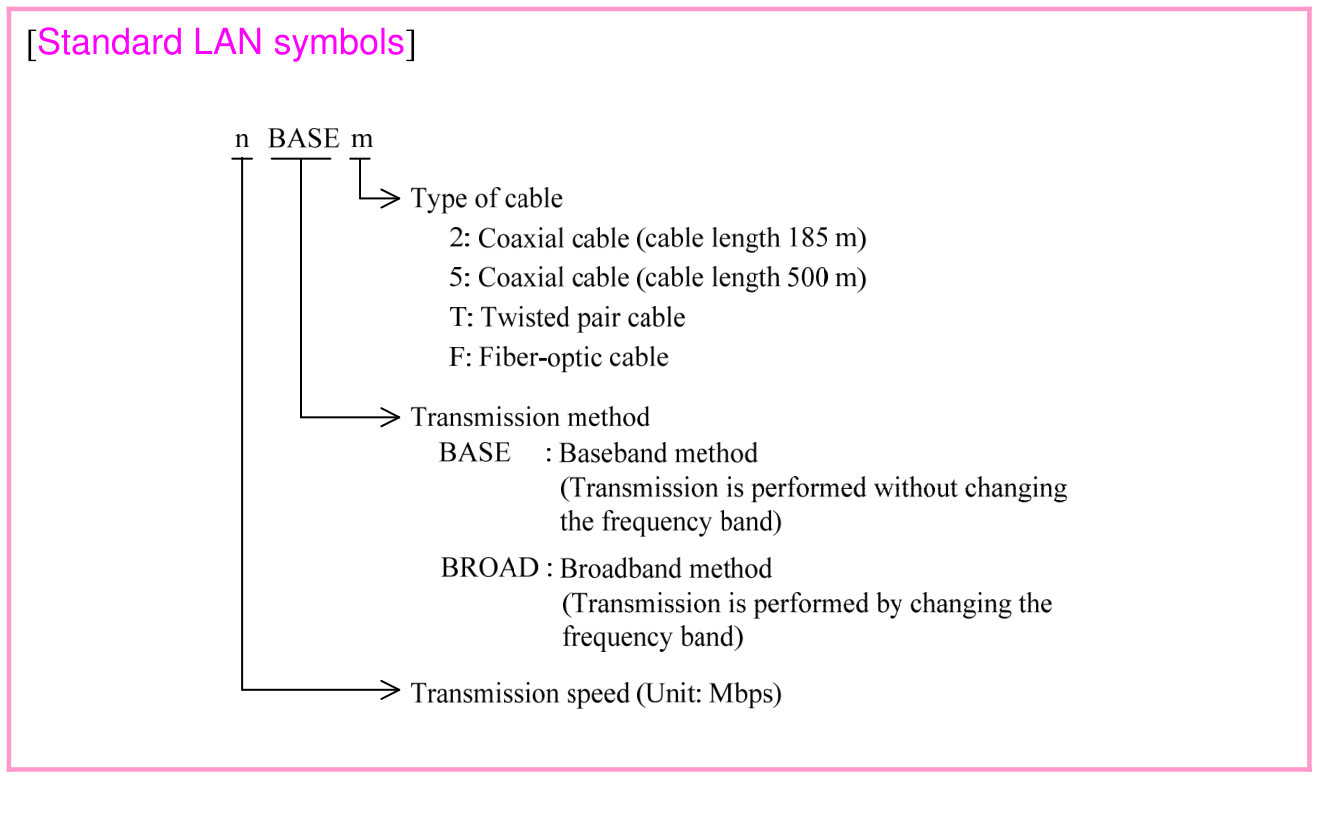
A wired LAN is connected by using a communication line (i.e., cable), and supports the IEEE 802.3 standard. An IEEE 802.3 LAN is also called Ethernet, and is represented by the following symbolic notation. For example, 10BASE5 is a baseband LAN which has a transmission speed of 10 Mbps and uses a coaxial cable with a cable length of 500 m. · 1 question

p. 320

Original Basic Techniques of a LAN source table or explanation box, preserving its complete original arrangement, labels and values. Source text: [Standard LAN symbols]
p. 320 · Enlarge

In a wired LAN, the three types of media (i.e., cables) that are described below are used for connecting devices. Moreover, a LAN module (e.g., a LAN adapter, a NIC (Network Interface Card), as a standard installation or an additional installation) is used for connecting the PC to LAN.
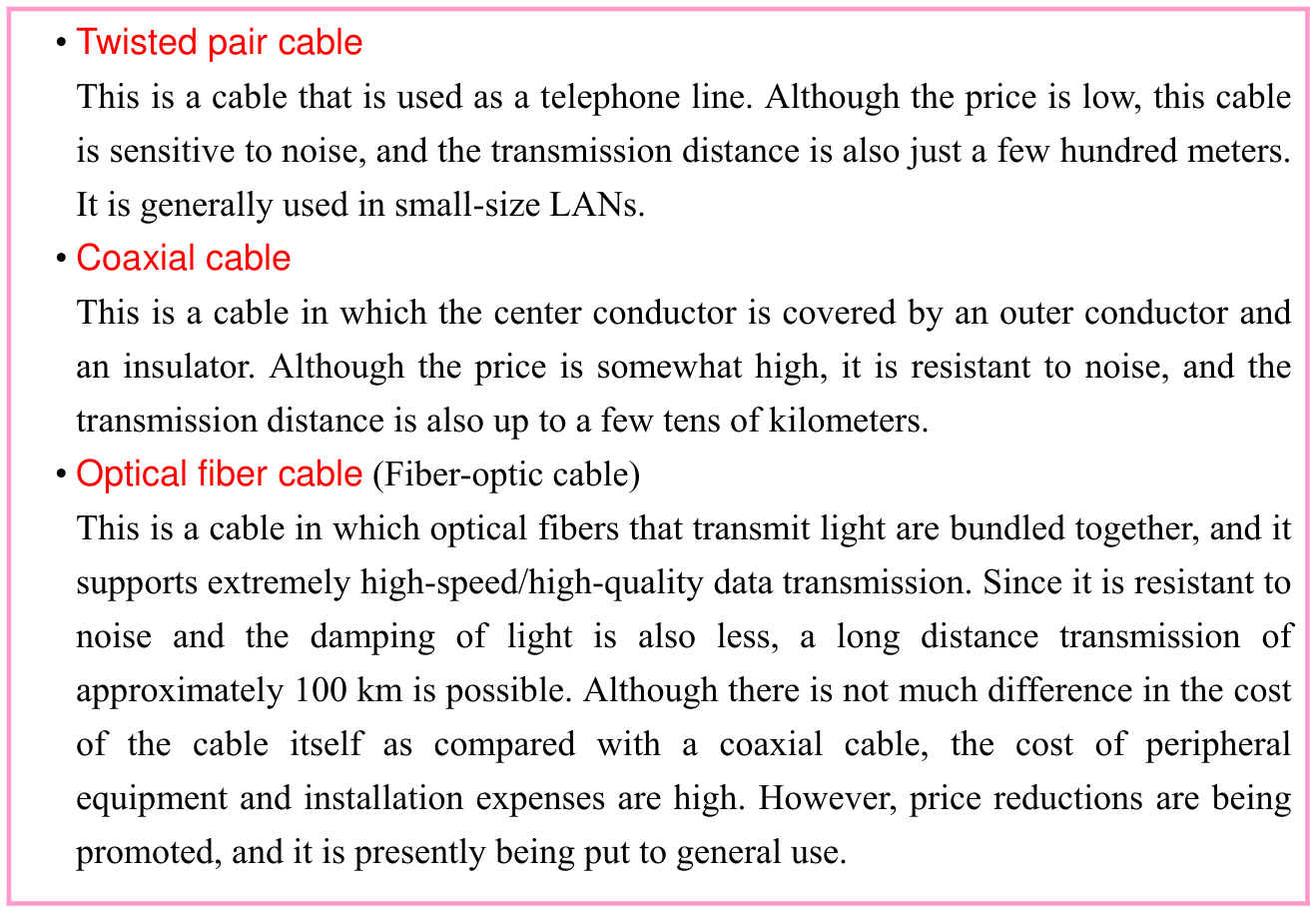
Original Basic Techniques of a LAN source table or explanation box, preserving its complete original arrangement, labels and values. Source text: • Twisted pair cable This is a cable that is used as a telephone line. Although the price is low, this cable is sensitive to noise, and the transmission distance is also just a few hundred meters. It is generally used in small-size LANs. • Coaxial cable This is a cable in which the center conductor is covered by an outer conductor and an insulator. Although the price is somewhat high, it is resistant to noise, and the transmission distance is also up to a few tens of kilometers. • Optical fiber cable (Fiber-optic cable) This is a cable in which optical fibers that transmit light are bundled together, and it supports extremely high-speed/high-quality data transmission. Since it is resistant to noise and the damping of light is also less, a long distance transmission of approximately 100 km is possible. Although there is not much difference in the cost of the cable itself as compared with a coaxial cable, the cost of peripheral equipment and installation expenses are high. However, price reductions are being promoted, and it is presently being put to general use.
p. 320 · Enlarge

p. 321

(2) Wireless LAN

A wireless LAN is connected by using electromagnetic waves or infrared rays, and supports the IEEE 802.11a/b/g/n standards (at present, IEEE 802.11n, which uses a frequency band of 2.4 GHz/5 GHz, and has a maximum communication speed of 600 Mbps is the main standard). Since a wireless LAN does not use cables, the layout can be changed easily, and as long as there are no obstacles, communication can be performed even at a distance of 50 to 100 meters. When a wireless LAN is used, a user connects the terminal to a wireless LAN access point. At this time, the wireless LAN sets an access point identifier SSID (Service Set IDentifier), or a network identifier ESSID (Extended SSID), which is an extended edition of SSID, in order to identify the wireless LAN access point. By making this setting, only the devices having the same SSID or ESSID are identified as the appropriate users (or devices), and therefore unauthorized use (or access) is prevented. However, since it is difficult to secure safety only through this method, it is necessary to examine sufficient security measures. In addition, a wireless LAN can even be connected to a wired LAN and the Internet through a wireless LAN access point. (Generally, this method is often used.)
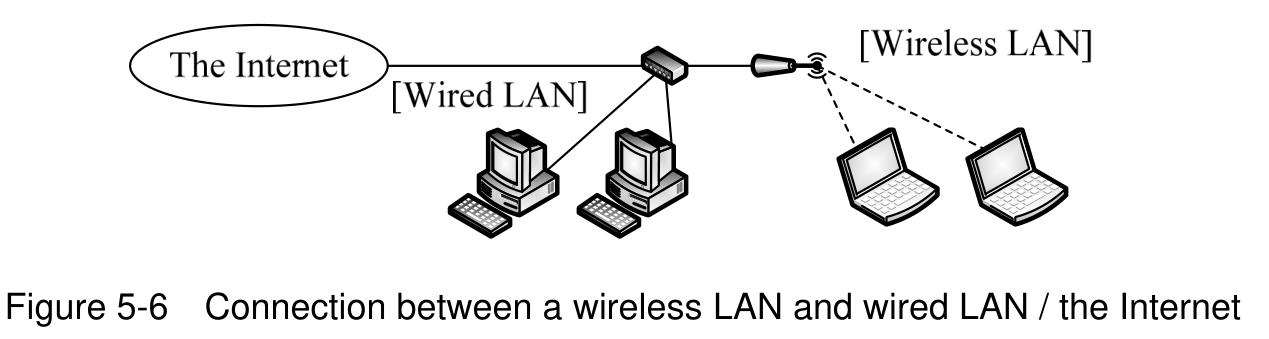
Wireless clients, access point, wired LAN and Internet connections. Source text: Figure 5-6 Connection between a wireless LAN and wired LAN / the Internet
p. 321 · Enlarge

Section progress

Original chapter exercises

Original chapter exercises →

New FE Textbook Vol.1 · IT Fundamentals · First Edition, April 2015