Contents
Chapter 4 · DatabasePractice

LEARN WITH HARU

Video Lesson တွေက Haru အတန်းသားတွေအတွက်ပါ

Haru ရဲ့ ITPEC FE Full Course မှာ ယခု သင်ခန်းစာတွေကို တစ်ခုချင်း တစ်ကြောင်းချင်း အသေးစိတ်ရှင််ရှင်းပြထားပါတယ်

အခြေခံ မရှိတဲ့ ကျောင်းသားများစွာဟာလည်း ဒီ Course နဲ့ ပဲ အောင်မြင်ကုန်ကြပါပြီ

အတန်းမအပ်သေးပဲ Haru ဆီမှာ အစမ်းသင်ကြည့်ချင်ပါသလား?

သင်တန်းသားတွေရဲ့ စကားသံများ

သင်တန်းသားတွေရဲ့ စကားသံများ
Learning toolsProgress & bookmarks

Current section

2-1-3 Definition of View

p. 264

Progress

Not marked complete

Progress and bookmarks

p. 264

2-1-3 Definition of View

View refers to the table that is virtually set from the real tables and corresponds to external schema. (View is also referred to as virtual table, and table is also referred to as base table.) View can record attributes of a single table and new attributes that are created from multiple tables. Users can operate the defined views in the same way as normal tables, and therefore, restrict the scope of use of a database, which can help in data security protection and maintenance. CREATE VIEW statement is used for defining a view.

p. 265

Original textbook table, example or syntax box, with its complete original layout. Source text: CREATE VIEW Name AS SELECT … Note: In the underlined part, write the SELECT statement for extracting data. (Details are explained in 2-2.)
p. 265 · Enlarge

ex03: Extract StudentNumber and Name from the “Student” table and define the view “Name”.

Original SQL worked example with its complete source code, indentation, punctuation, source frame and any attached original notes. Source text: CREATE VIEW Name AS SELECT StudentNumber, Name FROM Student Note: Underlined part is the SELECT statement that extracts StudentNumber and Name from the Student table.
p. 265 · Enlarge

View defines only a virtual table and does not create any new tables. (It can simply be considered that the shaded portion in Figure 4-9 is made invisible.) Therefore, updating a view would also reflect the updated results in the original table. Because of that, there is a constraint that the views where tuples and the original table are not in a 1:1 relationship cannot be updated. Such a view (e.g. view that uses the set function) is described later.
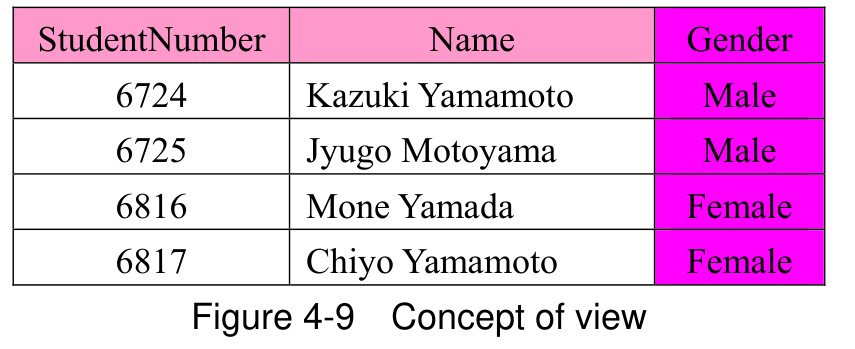
Original view diagram: StudentNumber and Name remain visible while the Gender column is shaded magenta, illustrating a view that omits Gender. Four original student rows, source colors and the complete caption are retained. Source text: StudentNumber Name Gender 6724 Kazuki Yamamoto Male 6725 Jyugo Motoyama Male 6816 Mone Yamada Female 6817 Chiyo Yamamoto Female Figure 4-9 Concept of view
p. 265 · Enlarge

Section progress

Original chapter exercises

Original chapter exercises →

New FE Textbook Vol.1 · IT Fundamentals · First Edition, April 2015