Contents
Chapter 4 · DatabasePractice

LEARN WITH HARU

Video Lesson တွေက Haru အတန်းသားတွေအတွက်ပါ

Haru ရဲ့ ITPEC FE Full Course မှာ ယခု သင်ခန်းစာတွေကို တစ်ခုချင်း တစ်ကြောင်းချင်း အသေးစိတ်ရှင််ရှင်းပြထားပါတယ်

အခြေခံ မရှိတဲ့ ကျောင်းသားများစွာဟာလည်း ဒီ Course နဲ့ ပဲ အောင်မြင်ကုန်ကြပါပြီ

အတန်းမအပ်သေးပဲ Haru ဆီမှာ အစမ်းသင်ကြည့်ချင်ပါသလား?

သင်တန်းသားတွေရဲ့ စကားသံများ

သင်တန်းသားတွေရဲ့ စကားသံများ

Highlighted text? Practice this concept. Highlighted passages and figures open related questions.

Practice related questions (1)Progress & bookmarks

Current section

2-1-2 Definition of Tables

p. 263

Practice this section 1 linked exam question with default filters

Progress

Not marked complete

Related questions in this lesson 1

Original SQL data types and constraints1
Progress and bookmarks

p. 263

2-1-2 Definition of Tables

CREATE TABLE statement is used for defining a table.
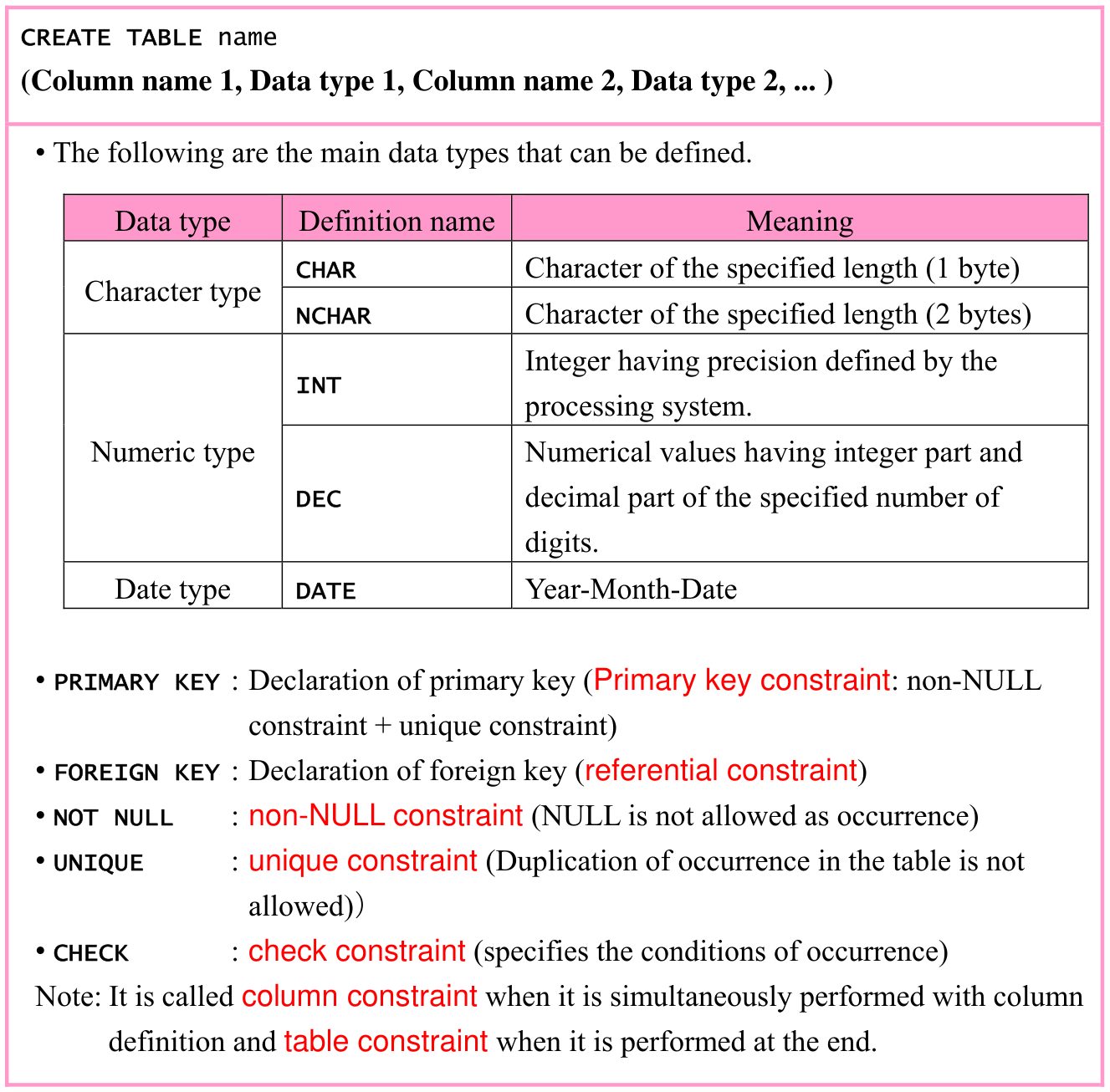
Original textbook table, example or syntax box, with its complete original layout. Source text: CREATE TABLE name (Column name 1, Data type 1, Column name 2, Data type 2, ... ) • The following are the main data types that can be defined. Data type Definition name Meaning Character of the specified length (1 byte) CHAR Character type Character of the specified length (2 bytes) NCHAR Integer having precision defined by the INT processing system. Numeric type Numerical values having integer part and decimal part of the specified number of DEC digits. Date type Year-Month-Date DATE • PRIMARY KEY : Declaration of primary key (Primary key constraint: non-NULL constraint + unique constraint) • FOREIGN KEY : Declaration of foreign key (referential constraint) • NOT NULL : non-NULL constraint (NULL is not allowed as occurrence) • UNIQUE : unique constraint (Duplication of occurrence in the table is not allowed)) • CHECK : check constraint (specifies the conditions of occurrence) Note: It is called column constraint when it is simultaneously performed with column definition and table constraint when it is performed at the end.
p. 263 · Enlarge
Original SQL data types and constraints · 1 practice questions

p. 264

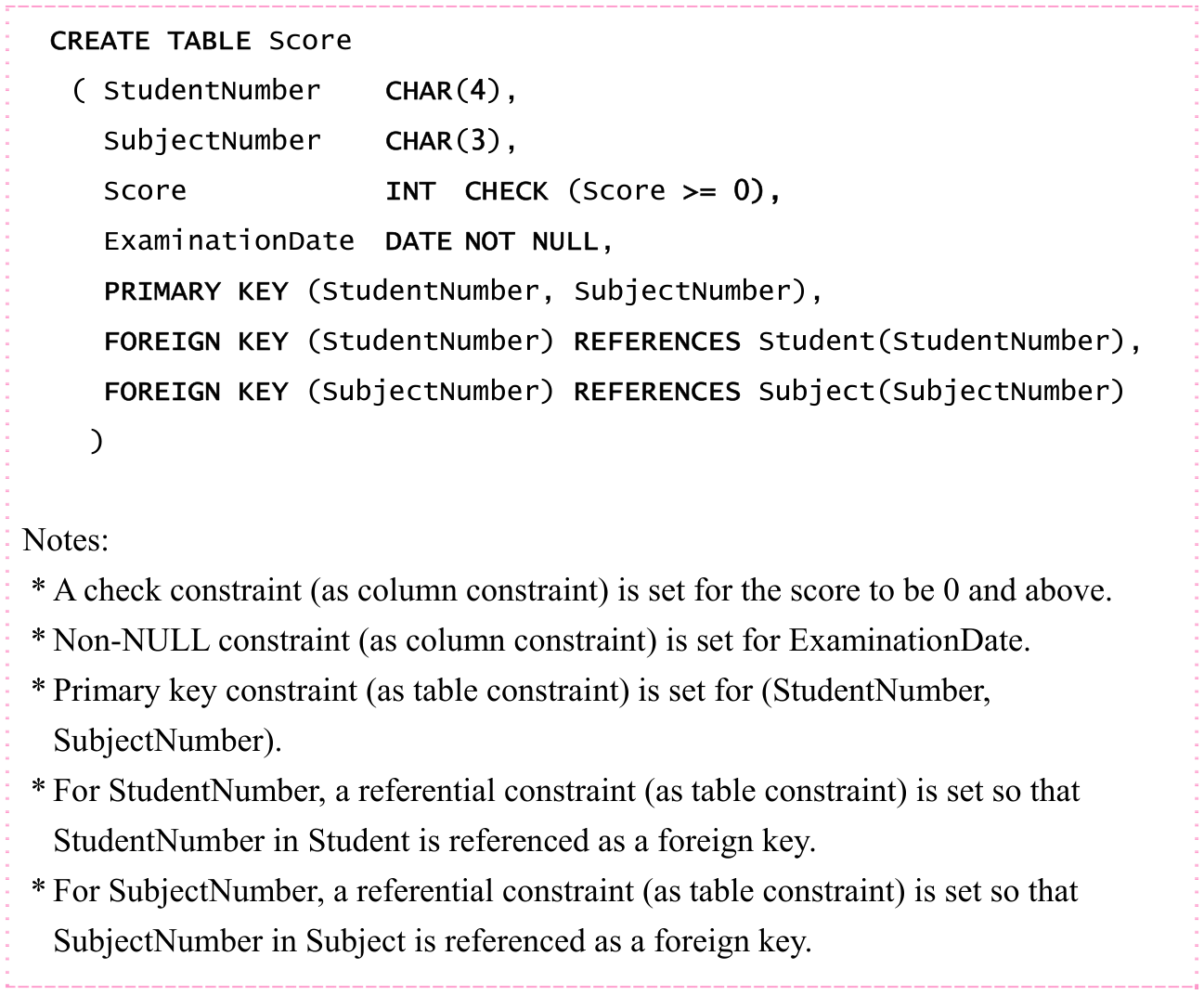
ex02: Define table “Score”.

Original SQL worked example with its complete source code, indentation, punctuation, source frame and any attached original notes. Source text: CREATE TABLE Score ( StudentNumber CHAR(4), SubjectNumber CHAR(3), Score INT CHECK (Score >= 0), ExaminationDate DATE NOT NULL, PRIMARY KEY (StudentNumber, SubjectNumber), FOREIGN KEY (StudentNumber) REFERENCES Student(StudentNumber), FOREIGN KEY (SubjectNumber) REFERENCES Subject(SubjectNumber) ) Notes: * A check constraint (as column constraint) is set for the score to be 0 and above. * Non-NULL constraint (as column constraint) is set for ExaminationDate. * Primary key constraint (as table constraint) is set for (StudentNumber, SubjectNumber). * For StudentNumber, a referential constraint (as table constraint) is set so that StudentNumber in Student is referenced as a foreign key. * For SubjectNumber, a referential constraint (as table constraint) is set so that SubjectNumber in Subject is referenced as a foreign key.
p. 264 · Enlarge

Moreover, use the following ALTER TABLE statement when the configuration of the defined tables (i.e., database) is changed (or redefined).

Original textbook table, example or syntax box, with its complete original layout. Source text: ALTER TABLE name Details of redefinition Note: In the underlined part, write ADD when attribute is added, write MODIFY when data type is changed, and so on.
p. 264 · Enlarge

Original chapter exercises

Original chapter exercises →

New FE Textbook Vol.1 · IT Fundamentals · First Edition, April 2015