Contents
Chapter 4 · DatabasePractice

LEARN WITH HARU

Video Lesson တွေက Haru အတန်းသားတွေအတွက်ပါ

Haru ရဲ့ ITPEC FE Full Course မှာ ယခု သင်ခန်းစာတွေကို တစ်ခုချင်း တစ်ကြောင်းချင်း အသေးစိတ်ရှင််ရှင်းပြထားပါတယ်

အခြေခံ မရှိတဲ့ ကျောင်းသားများစွာဟာလည်း ဒီ Course နဲ့ ပဲ အောင်မြင်ကုန်ကြပါပြီ

အတန်းမအပ်သေးပဲ Haru ဆီမှာ အစမ်းသင်ကြည့်ချင်ပါသလား?

သင်တန်းသားတွေရဲ့ စကားသံများ

သင်တန်းသားတွေရဲ့ စကားသံများ

Highlighted text? Practice this concept. Highlighted passages and figures open related questions.

Practice related questions (7)Progress & bookmarks

Current section

1-3-3 Database Control Function

p. 256

Practice this section 7 linked exam questions with default filters

Progress

Not marked complete

Related questions in this lesson 10

Exclusive control preserves data integrity1Original rollback and rollforward definitions3Database recovery logs2Database confidentiality and per-user access rights2Database locking: deadlock and granularity2ACID transaction characteristics1
Progress and bookmarks

p. 256

1-3-3 Database Control Function

Database control function is a function for improving reliability and security of the data recorded in the databases.

(1) Maintenance function

Maintenance function is a function for maintaining integrity of data (i.e., data integrity). The following double update is the typical example where integrity of data is lost. (As a result, inconsistency occurs.)
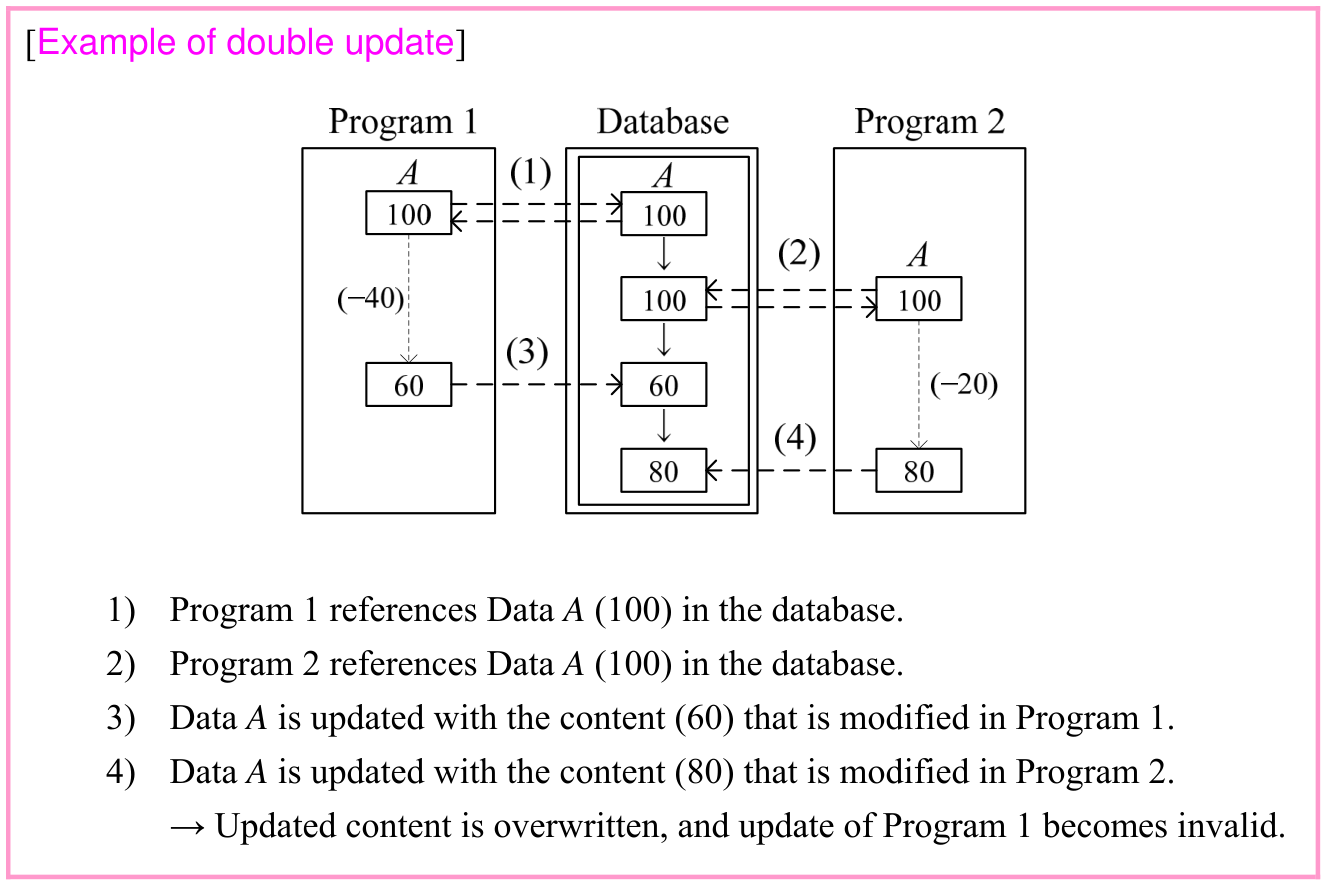
Complete double-update example: both programs reference A=100. Program 1 updates to 60 after subtracting 40; Program 2 updates to 80 after subtracting 20 from its earlier value. Original dashed arrows, numbered sequence and the source explanation of the overwritten update are included. Source text: [Example of double update] 1) Program 1 references Data A (100) in the database. 2) Program 2 references Data A (100) in the database. 3) Data A is updated with the content (60) that is modified in Program 1. 4) Data A is updated with the content (80) that is modified in Program 2. → Updated content is overwritten, and update of Program 1 becomes invalid.
p. 256 · Enlarge

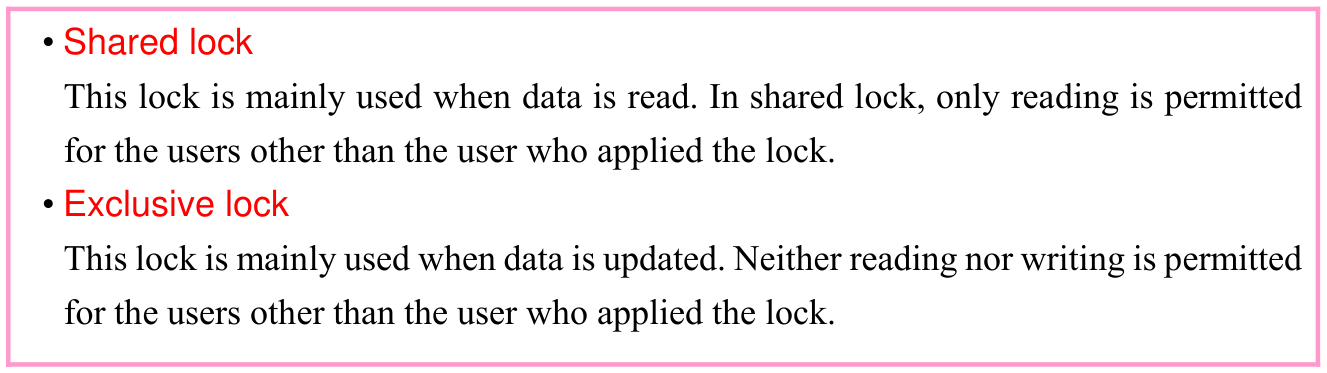
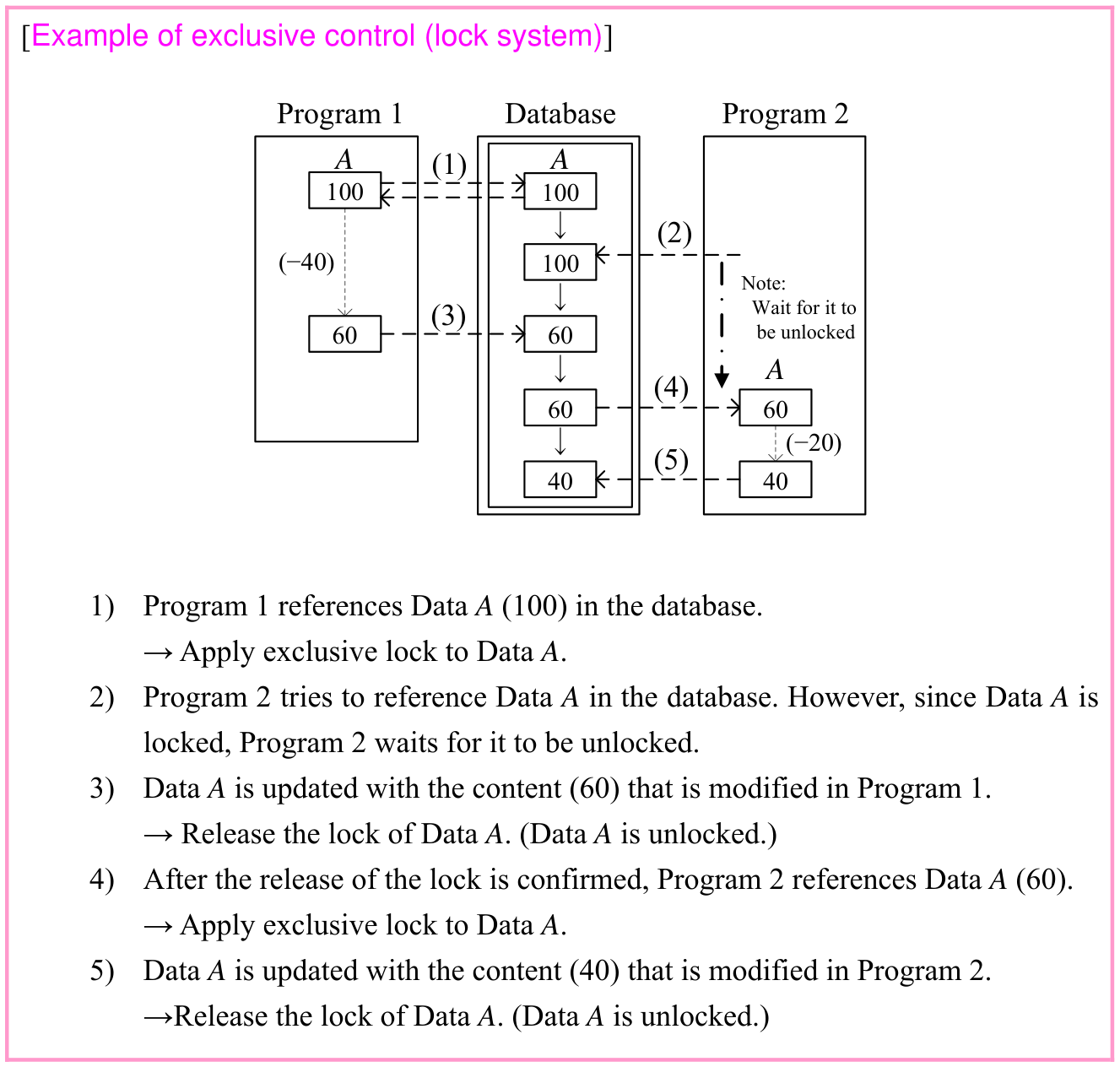
Exclusive control is designed for resolving such a problem. There are several methods in exclusive control, and the typical method is lock system. The lock system locks the database record that is referenced and restricts further referencing until the process is completed. When this method is used, there is no risk of data being referenced by another program during the update, therefore, the integrity of data increases. The following two types of locks are used separately in the lock system. · 1 question

p. 257

Original textbook table, example or syntax box, with its complete original layout. Source text: • Shared lock This lock is mainly used when data is read. In shared lock, only reading is permitted for the users other than the user who applied the lock. • Exclusive lock This lock is mainly used when data is updated. Neither reading nor writing is permitted for the users other than the user who applied the lock.
p. 257 · Enlarge
Complete exclusive-lock example: Program 1 locks A=100; Program 2 waits. Program 1 updates A to 60 and unlocks. Program 2 then reads 60, locks, updates to 40 and unlocks. All five original steps and their arrows remain together. Source text: [Example of exclusive control (lock system)] Program 1 Database Program 2 A (1) A 100 100 ↓ (2) (−40) 100 Note: ↓ (3) Wait for it to 60 60 be unlocked ↓ A (4) 60 60 ↓ (−20) (5) 40 40 1) Program 1 references Data A (100) in the database. → Apply exclusive lock to Data A. 2) Program 2 tries to reference Data A in the database. However, since Data A is locked, Program 2 waits for it to be unlocked. 3) Data A is updated with the content (60) that is modified in Program 1. → Release the lock of Data A. (Data A is unlocked.) 4) After the release of the lock is confirmed, Program 2 references Data A (60). → Apply exclusive lock to Data A. 5) Data A is updated with the content (40) that is modified in Program 2. →Release the lock of Data A. (Data A is unlocked.)
p. 257 · Enlarge

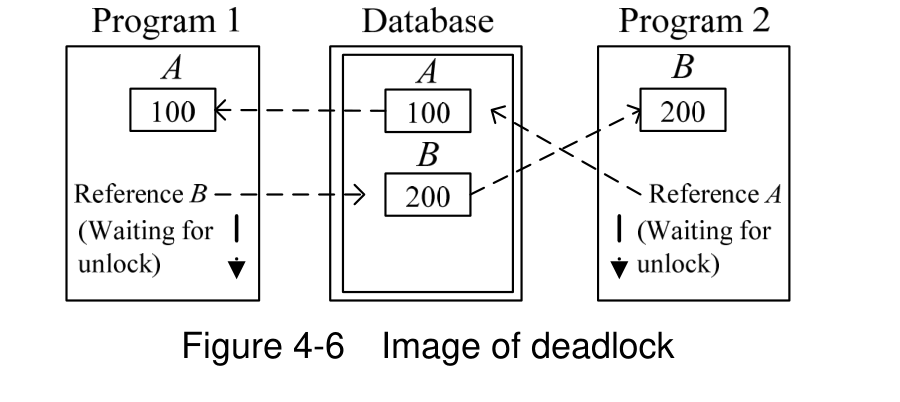
However, the problem called deadlock may occur in the lock system. Deadlock is the phenomenon where multiple programs are simultaneously in the waiting state because of the lock and their executions completely stop. It is difficult to fully avoid the deadlock. But, by reducing the unit (granularity) of applying the lock, the possibility of the occurrence of deadlock can be reduced. · 2 questions

p. 258

Deadlock diagram: Program 1 holds A (100) while requesting B; Program 2 holds B (200) while requesting A. Dashed reference arrows and downward Waiting for unlock arrows show the mutual wait around the database A/B records. Source text: Figure 4-6 Image of deadlock
p. 258 · Enlarge

Other methods of exclusive control include semaphore system, which manages databases as resources by means of semaphore.

(2) Security protection function

Security protection function is a function for maintaining security of data (i.e., data security). Critical data and highly confidential data are stored in databases. Therefore, data security protection becomes necessary. The following security protection functions are provided by DBMS.
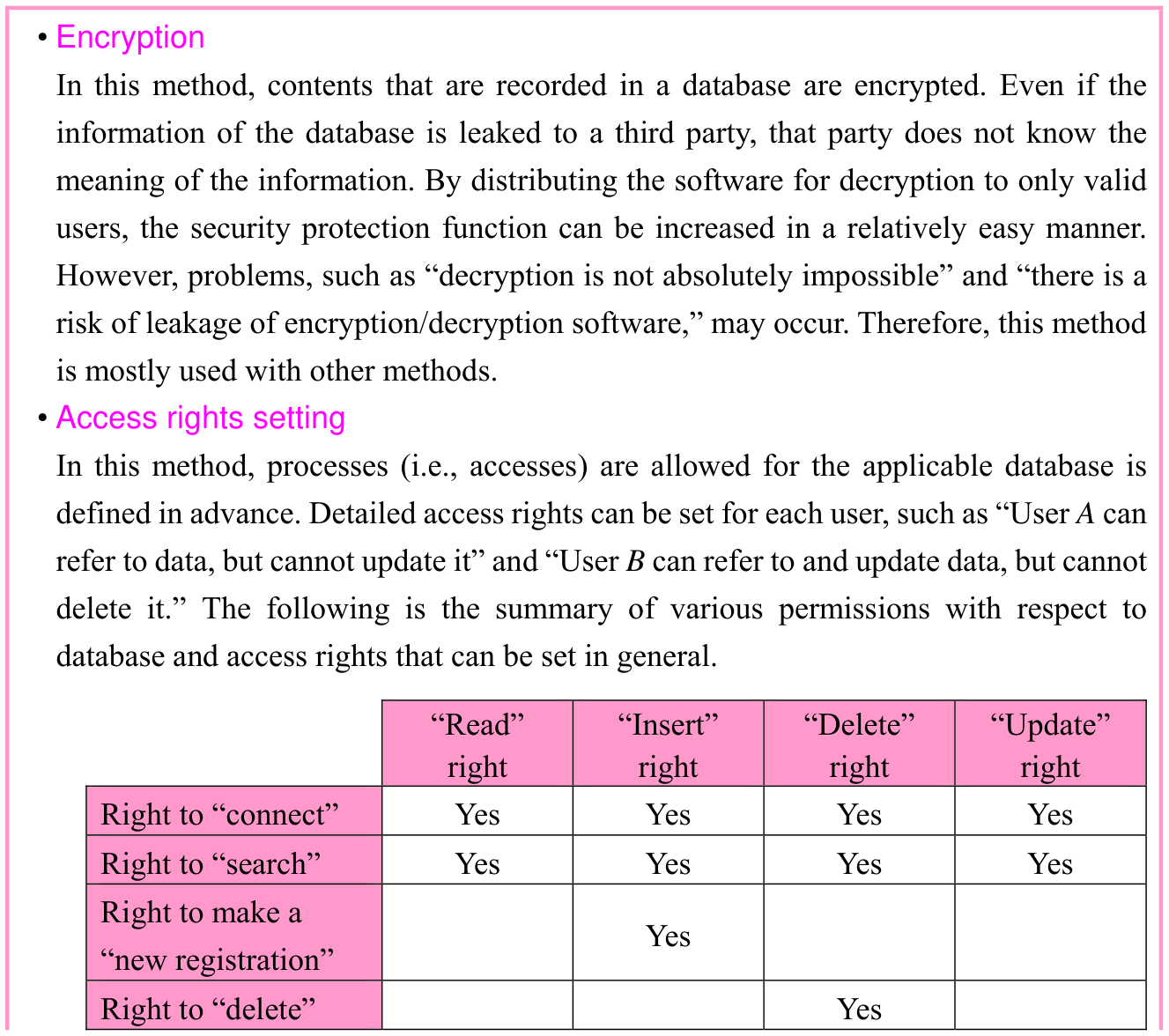
Original textbook table, example or syntax box, with its complete original layout. Source text: • Encryption In this method, contents that are recorded in a database are encrypted. Even if the information of the database is leaked to a third party, that party does not know the meaning of the information. By distributing the software for decryption to only valid users, the security protection function can be increased in a relatively easy manner. However, problems, such as “decryption is not absolutely impossible” and “there is a risk of leakage of encryption/decryption software,” may occur. Therefore, this method is mostly used with other methods. • Access rights setting In this method, processes (i.e., accesses) are allowed for the applicable database is defined in advance. Detailed access rights can be set for each user, such as “User A can refer to data, but cannot update it” and “User B can refer to and update data, but cannot delete it.” The following is the summary of various permissions with respect to database and access rights that can be set in general. “Read” “Insert” “Delete” “Update” right right right right Right to “connect” Yes Yes Yes Yes Right to “search” Yes Yes Yes Yes Right to make a Yes “new registration” Right to “delete” Yes
p. 258 · Enlarge
Database confidentiality and per-user access rights · 2 practice questions

p. 259

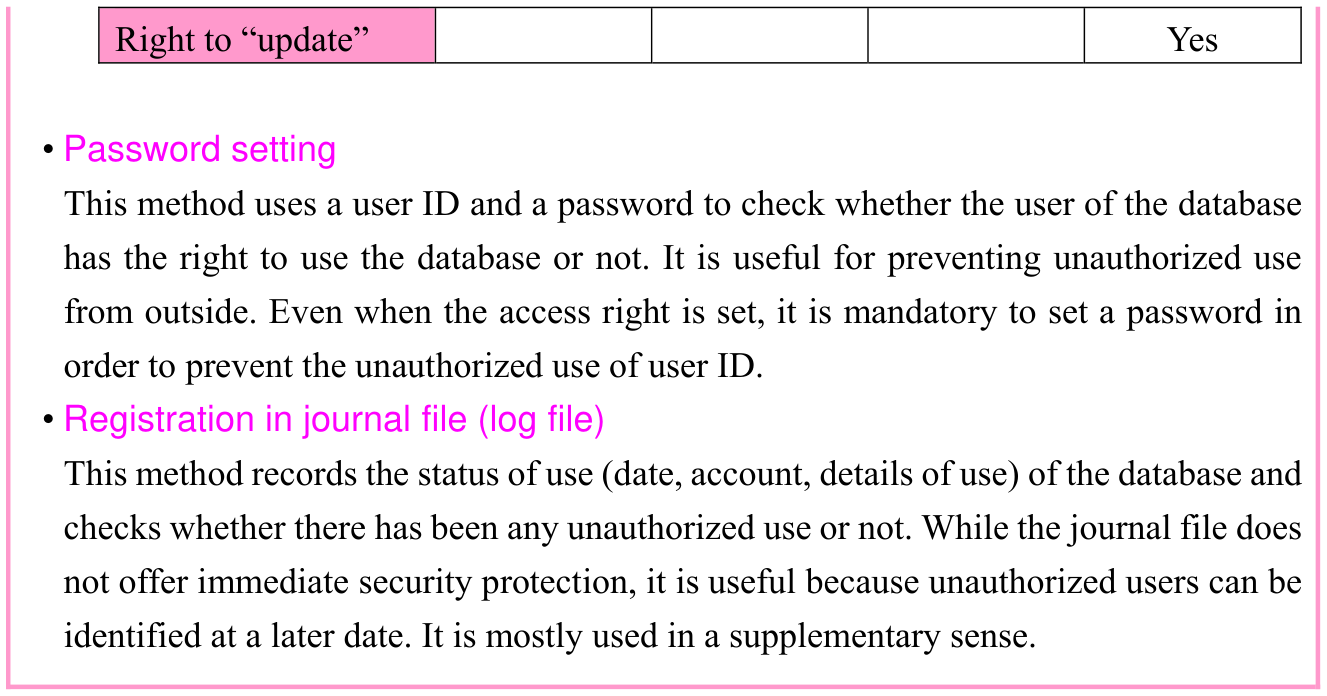
Original textbook table, example or syntax box, with its complete original layout. Source text: Right to “update” Yes • Password setting This method uses a user ID and a password to check whether the user of the database has the right to use the database or not. It is useful for preventing unauthorized use from outside. Even when the access right is set, it is mandatory to set a password in order to prevent the unauthorized use of user ID. • Registration in journal file (log file) This method records the status of use (date, account, details of use) of the database and checks whether there has been any unauthorized use or not. While the journal file does not offer immediate security protection, it is useful because unauthorized users can be identified at a later date. It is mostly used in a supplementary sense.
p. 259 · Enlarge

(3) Failure recovery function

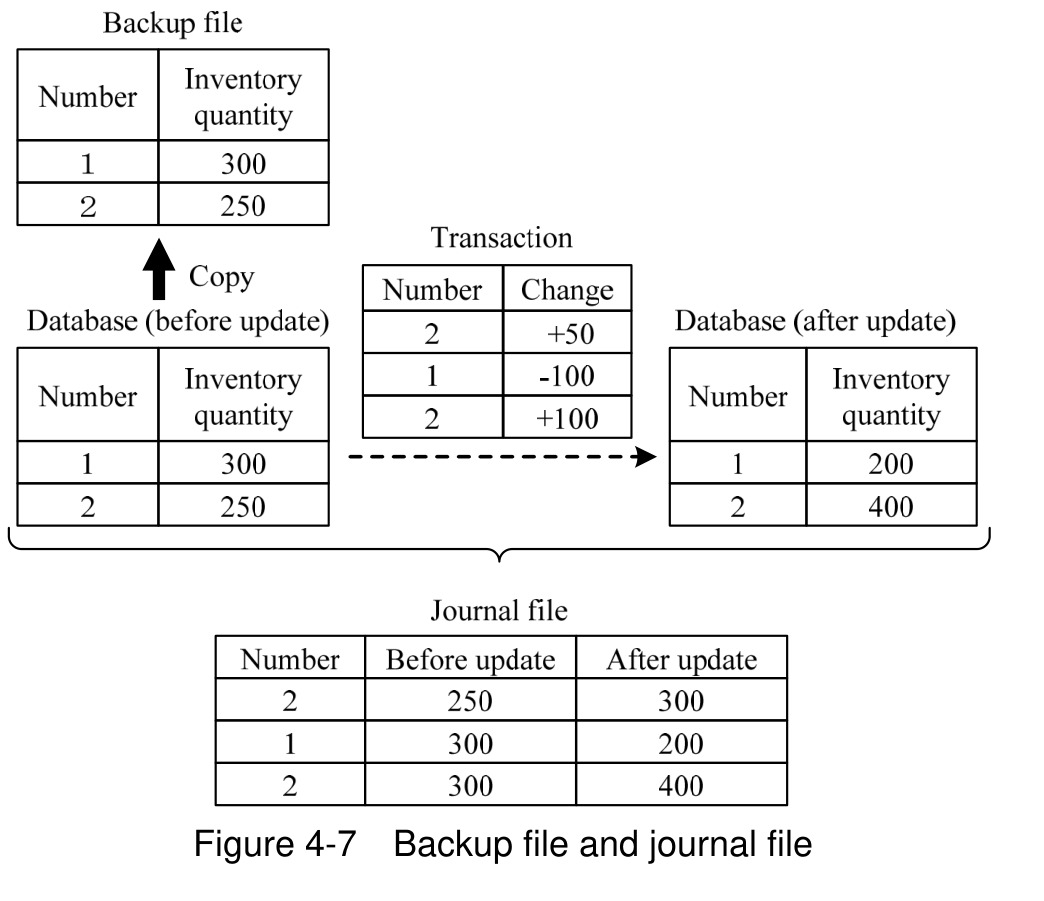
Failure recovery function is a function that restores databases at the occurrence of a failure. Failure recovery uses files, such as backup file where a database at a particular time is copied as it is, and journal file (i.e., log file) where an update process performed on the database is recorded. Journal records are created in the memory and are written in a file at the timing of commit (i.e., process of finalizing the update process) which is performed when the database update process for each transaction is completed. A log is prepared by setting a checkpoint for a certain time interval (or a certain processing amount). The database being updated in the memory is recorded in the checkpoint file. With this, it is possible to recover from the checkpoint time when a failure has occurred. · 2 questions

p. 260

Backup and journal example: initial inventories are 1=300 and 2=250. Transactions change 2 by +50, 1 by -100, then 2 by +100. Final inventories are 1=200 and 2=400. Journal rows retain each before/after value and the original copy/update arrows. Source text: Figure 4-7 Backup file and journal file
p. 260 · Enlarge

The following are two types of recovery processes performed for failure recovery.
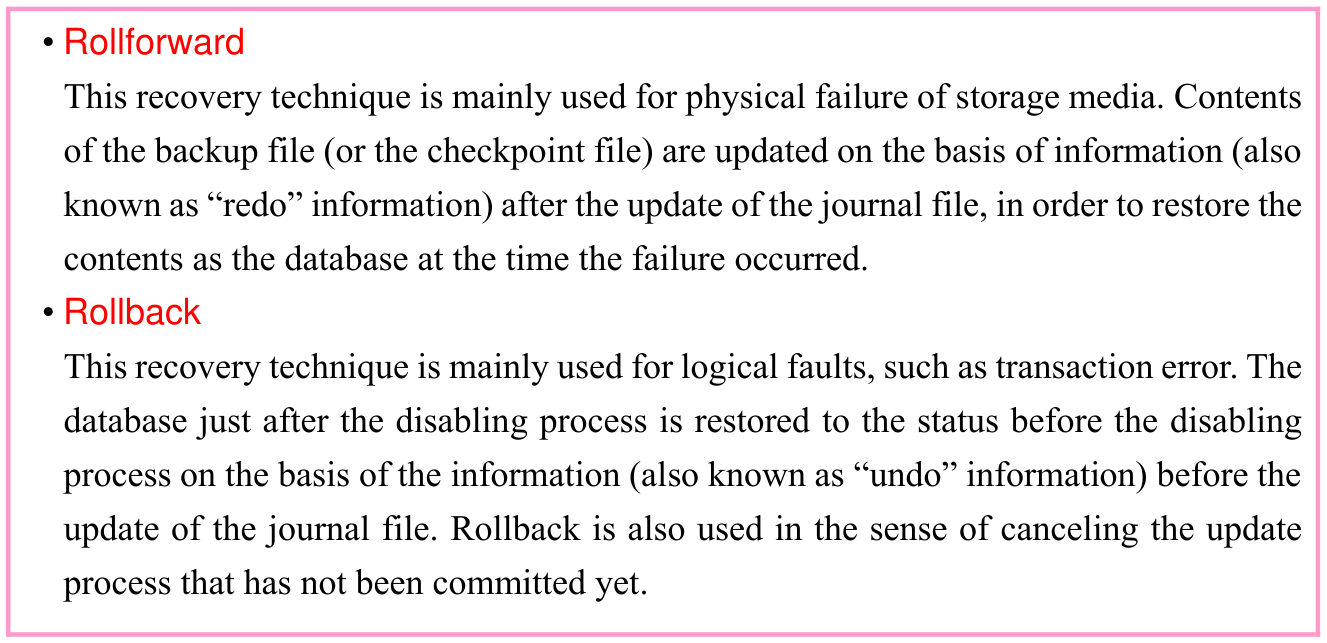
Original textbook table, example or syntax box, with its complete original layout. Source text: • Rollforward This recovery technique is mainly used for physical failure of storage media. Contents of the backup file (or the checkpoint file) are updated on the basis of information (also known as “redo” information) after the update of the journal file, in order to restore the contents as the database at the time the failure occurred. • Rollback This recovery technique is mainly used for logical faults, such as transaction error. The database just after the disabling process is restored to the status before the disabling process on the basis of the information (also known as “undo” information) before the update of the journal file. Rollback is also used in the sense of canceling the update process that has not been committed yet.
p. 260 · Enlarge
Original rollback and rollforward definitions · 3 practice questions

The recovery process is also performed for each transaction. In this case, transactions committed after a checkpoint are recovered to the status after completion of commit with rollforward. On the other hand, for the transactions that are running at the time the failure occurred, processes that are not committed are canceled (i.e., rolled back) and transactions are executed again after the database is reverted to the status before the process started. In the case of Figure 4-8, T1 and T2 committed after the checkpoint are recovered with rollforward from the checkpoint time. Meanwhile, T3, which was being updated at the time the

p. 261

failure occurred, is executed again when the database is reverted to the status before the process started with rollback from the checkpoint time.
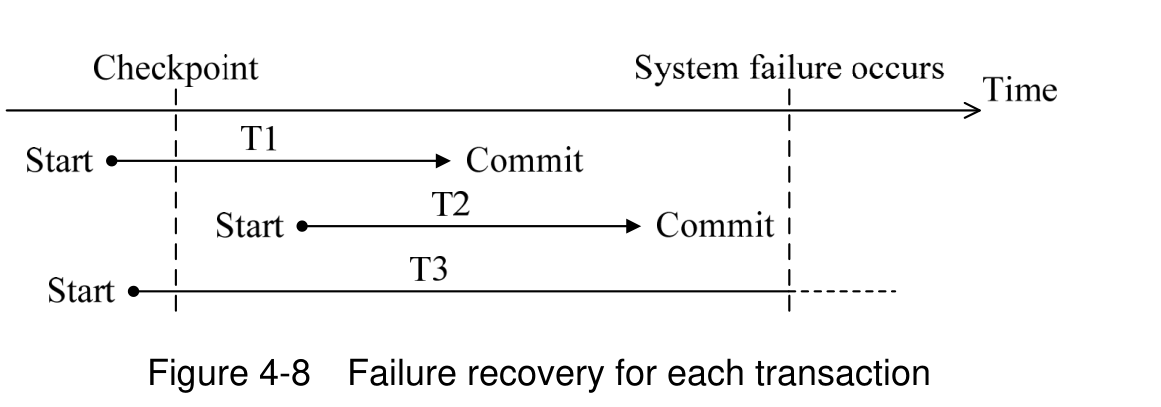
Original recovery timeline: T1 starts before the checkpoint and commits before failure; T2 starts after the checkpoint and commits before failure; T3 starts before the checkpoint and is still running at failure. Checkpoint and failure boundaries, start points, commit labels and time arrow remain intact. Source text: Figure 4-8 Failure recovery for each transaction
p. 261 · Enlarge

The following two methods are available for restarting the database.
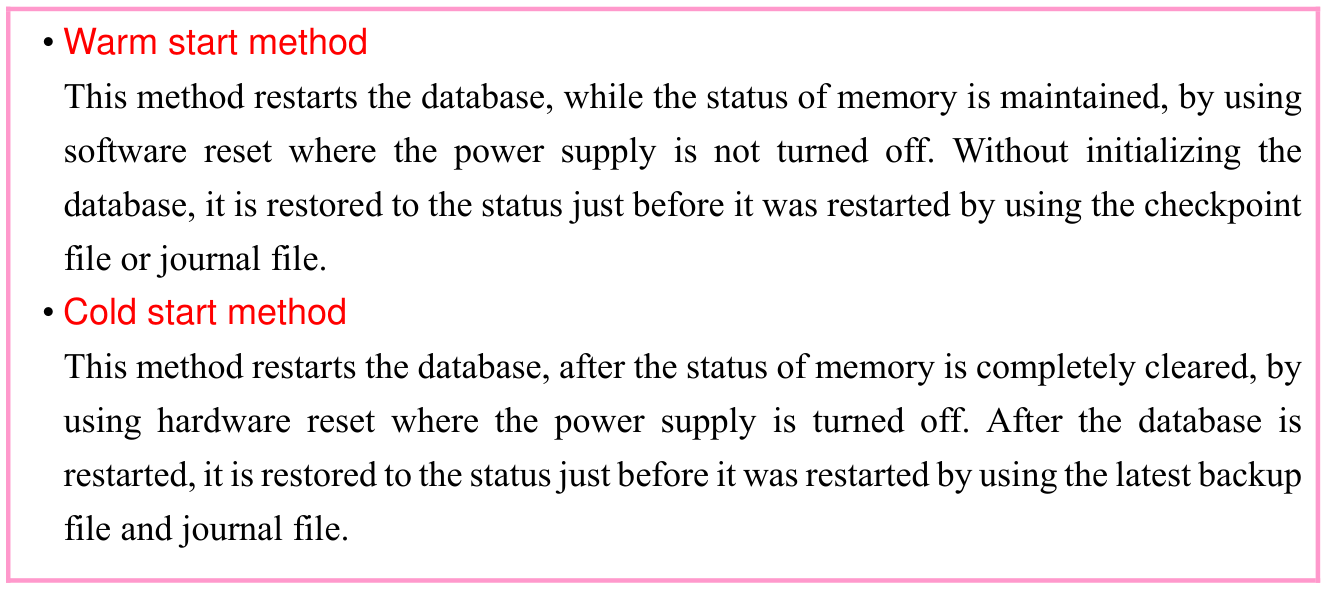
Original textbook table, example or syntax box, with its complete original layout. Source text: • Warm start method This method restarts the database, while the status of memory is maintained, by using software reset where the power supply is not turned off. Without initializing the database, it is restored to the status just before it was restarted by using the checkpoint file or journal file. • Cold start method This method restarts the database, after the status of memory is completely cleared, by using hardware reset where the power supply is turned off. After the database is restarted, it is restored to the status just before it was restarted by using the latest backup file and journal file.
p. 261 · Enlarge

A repetitive update (i.e., addition or deletion) of the database may result in a wasteful storage area that is not reused, which may decrease the access efficiency. In such a case, reorganization that optimizes the database is also one of the failure recovery functions.
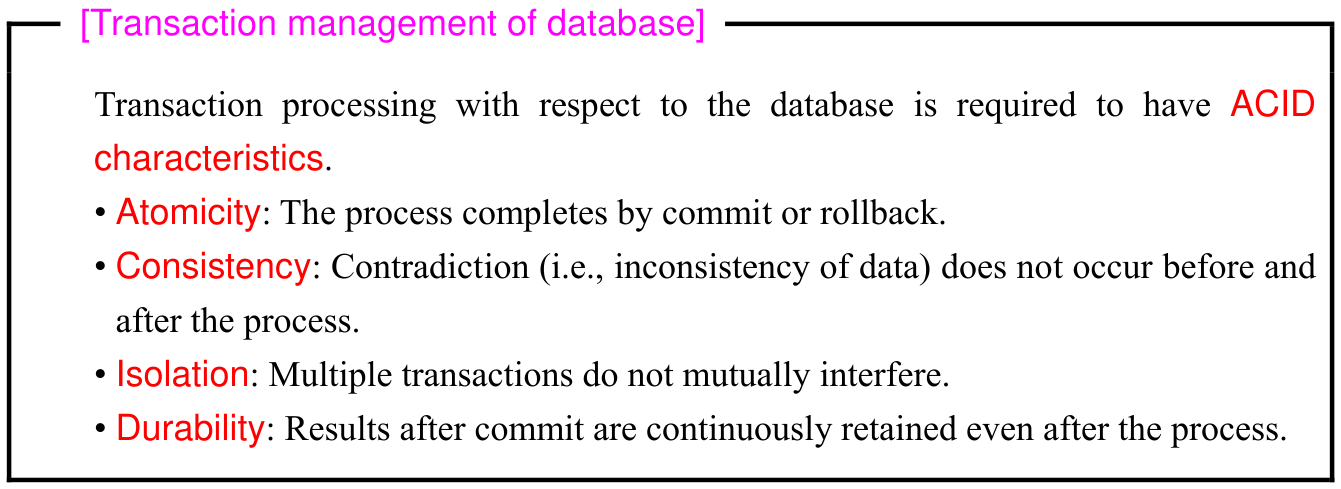
Original textbook table, example or syntax box, with its complete original layout. Source text: [Transaction management of database] Transaction processing with respect to the database is required to have ACID characteristics. • Atomicity: The process completes by commit or rollback. • Consistency: Contradiction (i.e., inconsistency of data) does not occur before and after the process. • Isolation: Multiple transactions do not mutually interfere. • Durability: Results after commit are continuously retained even after the process.
p. 261 · Enlarge
ACID transaction characteristics · 1 practice questions

Original chapter exercises

Original chapter exercises →

New FE Textbook Vol.1 · IT Fundamentals · First Edition, April 2015