Contents
Chapter 4 · DatabasePractice

LEARN WITH HARU

Video Lesson တွေက Haru အတန်းသားတွေအတွက်ပါ

Haru ရဲ့ ITPEC FE Full Course မှာ ယခု သင်ခန်းစာတွေကို တစ်ခုချင်း တစ်ကြောင်းချင်း အသေးစိတ်ရှင််ရှင်းပြထားပါတယ်

အခြေခံ မရှိတဲ့ ကျောင်းသားများစွာဟာလည်း ဒီ Course နဲ့ ပဲ အောင်မြင်ကုန်ကြပါပြီ

အတန်းမအပ်သေးပဲ Haru ဆီမှာ အစမ်းသင်ကြည့်ချင်ပါသလား?

သင်တန်းသားတွေရဲ့ စကားသံများ

သင်တန်းသားတွေရဲ့ စကားသံများ
Practice related questions (6)Progress & bookmarks

Current section

2-2 Data Manipulation

p. 266

Practice this section 6 linked exam questions with default filters

Progress

Not marked complete

Progress and bookmarks

p. 266

2 - 2 Data Manipulation

Data reference (i.e., extraction) from the database is the most widely-used data manipulation. In SQL, use the SELECT statement for referring to data. The explanation provided here is mainly focused on the method of using the SELECT statement.

p. 267

2-2-1 Reference Without Specifying Conditions

Reference without specifying conditions corresponds to the relational operation “Projection” that extracts the specified attributes. Use the following SELECT statement in reference without specifying conditions.
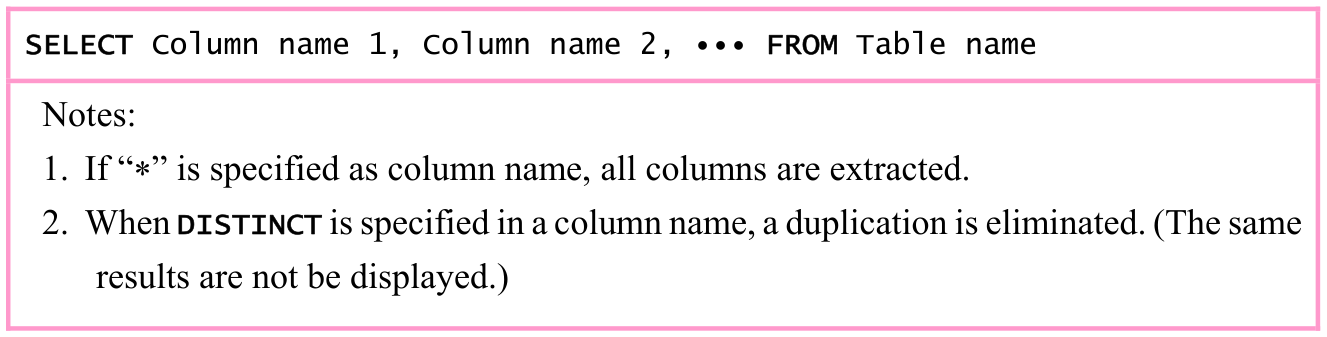
Original textbook table, example or syntax box, with its complete original layout. Source text: SELECT Column name 1, Column name 2, ∙∙∙ FROM Table name Notes: 1. If “*” is specified as column name, all columns are extracted. 2. When DISTINCT is specified in a column name, a duplication is eliminated. (The same results are not be displayed.)
p. 267 · Enlarge

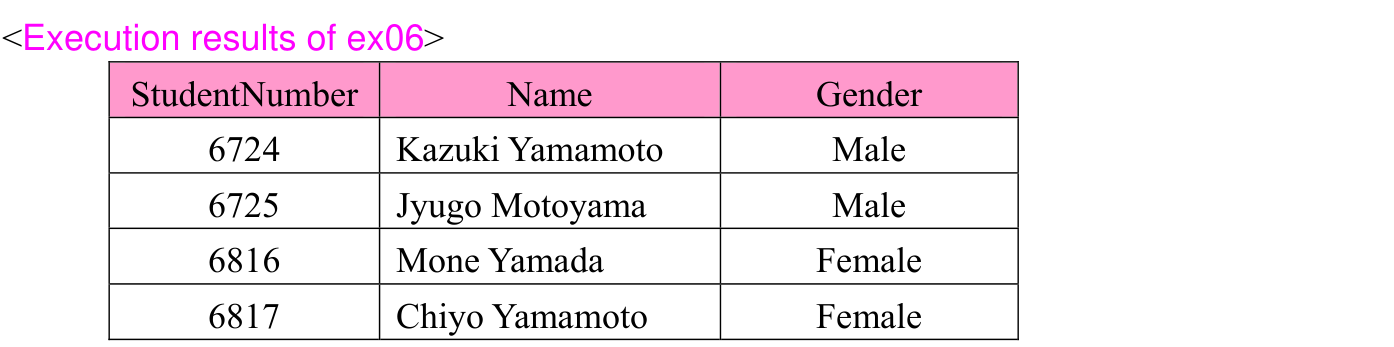
ex06: Extract all columns from the “Student” table.

Original SQL worked example with its complete source code, indentation, punctuation, source frame and any attached original notes. Source text: SELECT * FROM Student
p. 267 · Enlarge
Original SQL execution-result assembly, including the original table labels, rows, columns and associated notes. Source text: <Execution results of ex06> StudentNumber Name Gender 6724 Kazuki Yamamoto Male 6725 Jyugo Motoyama Male 6816 Mone Yamada Female 6817 Chiyo Yamamoto Female
p. 267 · Enlarge

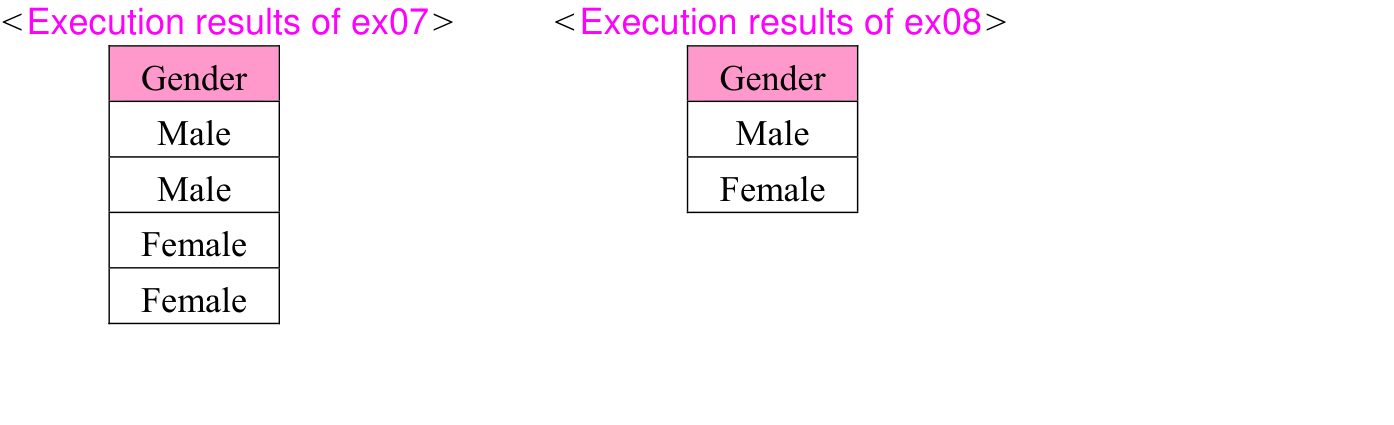
ex07: Extract Gender from the “Student” table. (Projection).

Original SQL worked example with its complete source code, indentation, punctuation, source frame and any attached original notes. Source text: SELECT Gender FROM Student
p. 267 · Enlarge

ex08: Extract Gender from the “Student” table after duplication is eliminated. (Projection)

Original SQL worked example with its complete source code, indentation, punctuation, source frame and any attached original notes. Source text: SELECT DISTINCT Gender FROM Student
p. 267 · Enlarge
Side-by-side original projection results: ex07 retains Male, Male, Female, Female; ex08 DISTINCT retains Male, Female. Both original captions and column labels remain with their tables. Source text: <Execution results of ex07> <Execution results of ex08> Gender Gender Male Male Male Female Female Female
p. 267 · Enlarge

Section progress

Original chapter exercises

Original chapter exercises →

New FE Textbook Vol.1 · IT Fundamentals · First Edition, April 2015