Contents
Chapter 4 · DatabasePractice

LEARN WITH HARU

Video Lesson တွေက Haru အတန်းသားတွေအတွက်ပါ

Haru ရဲ့ ITPEC FE Full Course မှာ ယခု သင်ခန်းစာတွေကို တစ်ခုချင်း တစ်ကြောင်းချင်း အသေးစိတ်ရှင််ရှင်းပြထားပါတယ်

အခြေခံ မရှိတဲ့ ကျောင်းသားများစွာဟာလည်း ဒီ Course နဲ့ ပဲ အောင်မြင်ကုန်ကြပါပြီ

အတန်းမအပ်သေးပဲ Haru ဆီမှာ အစမ်းသင်ကြည့်ချင်ပါသလား?

သင်တန်းသားတွေရဲ့ စကားသံများ

သင်တန်းသားတွေရဲ့ စကားသံများ

Highlighted text? Practice this concept. Highlighted passages and figures open related questions.

Practice related questions (1)Progress & bookmarks

Current section

2-2-5 Joining the Tables

p. 273

Progress

Not marked complete

Related questions in this lesson 1

Equijoin conditions in WHERE1
Progress and bookmarks

p. 273

2-2-5 Joining the Tables

Joining the tables means combining two or more tables into one table. There are a few methods of joining. However, the easiest method is explained by using the following two tables.

Original join input tables alpha and beta. Alpha has X/Y rows X1/Y2 and X2/Y1; beta has Y/Z rows Y1/Z1 and Y2/Z2. Greek table labels and all four cells per table remain. Source text: <α> <β> X Y Y Z X1 Y2 Y1 Z1 X2 Y1 Y2 Z2
p. 273 · Enlarge

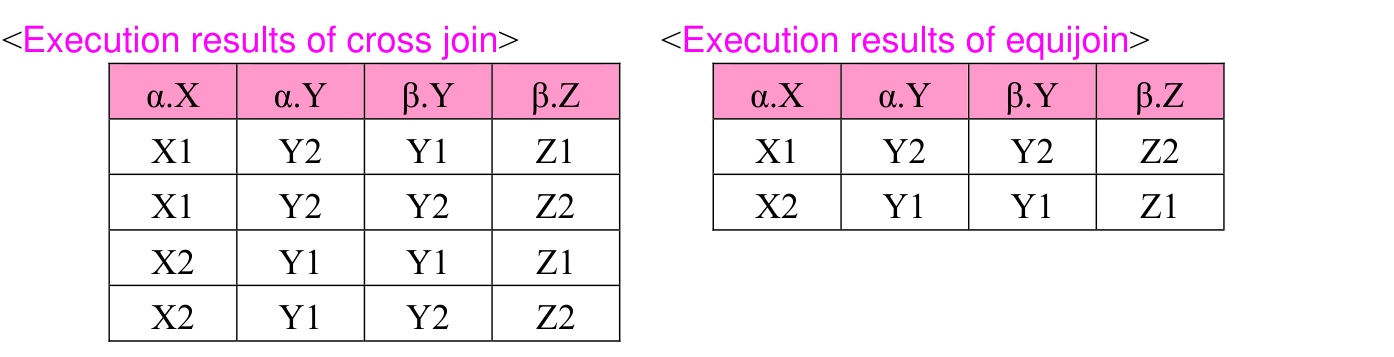
When two or more tables are used, list all tables used in the FROM clause. With this, the combinations (i.e., direct product) of all tuples of the specified tables are created. This method of joining, which takes the direct product of two or more tables, is called cross join.


Original SQL worked example with its complete source code, indentation, punctuation, source frame and any attached original notes. Source text: [Cross join] SELECT * FROM α, β
p. 273 · Enlarge

When two or more tables are joined, values of the columns having common meaning mostly combine the same tuples. Therefore, with the condition of the WHERE clause, extract the tuples having the same values of column from the results of cross join. (Joining the tuples having the same value of the corresponding column is called equijoin.) · 1 question

Original SQL worked example with its complete source code, indentation, punctuation, source frame and any attached original notes. Source text: [Equijoin] SELECT * FROM α, β WHERE α.Y = β.Y
p. 273 · Enlarge

p. 274

Original cross-join and equijoin result tables, side by side, retaining Greek-qualified column headers. Cross join has four rows; equijoin has two matching-Y rows. Source text: <Execution results of cross join> <Execution results of equijoin> α.X α.Y β.Y β.Z α.X α.Y β.Y β.Z X1 Y2 Y1 Z1 X1 Y2 Y2 Z2 X1 Y2 Y2 Z2 X2 Y1 Y1 Z1 X2 Y1 Y1 Z1 X2 Y1 Y2 Z2
p. 274 · Enlarge

ex20: From the “Score” table and the “Subject” table, extract StudentNumber, SubjectName for which the students took an examination, and Score.

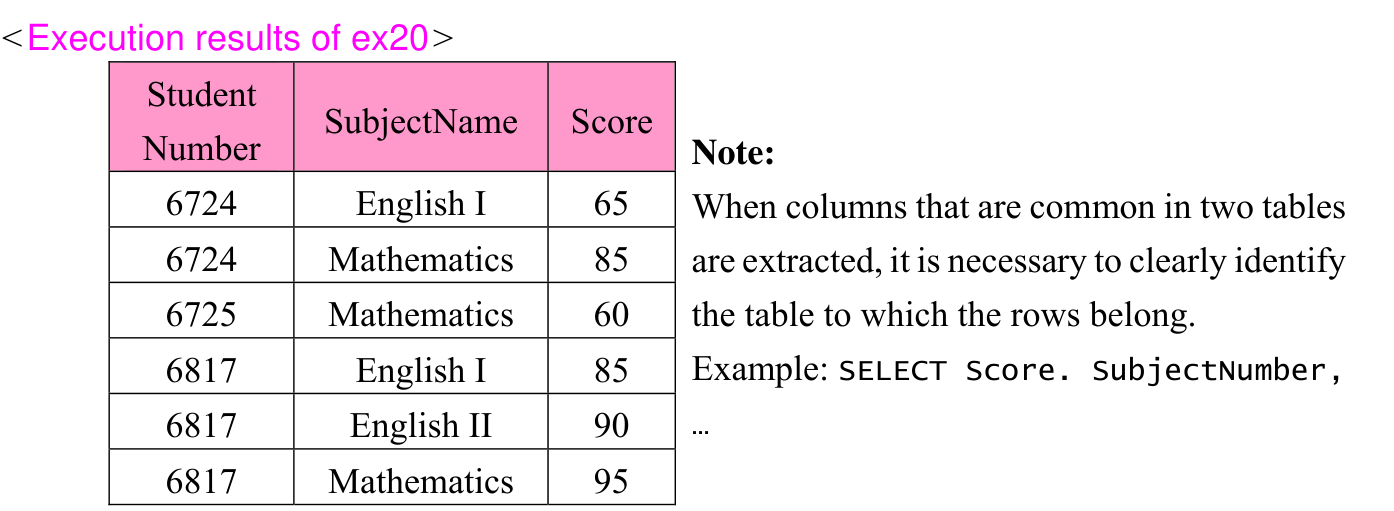
Original SQL worked example with its complete source code, indentation, punctuation, source frame and any attached original notes. Source text: SELECT StudentNumber, SubjectName, Score FROM Score, Subject WHERE Score.SubjectNumber = Subject.SubjectNumber
p. 274 · Enlarge
Original six-row joined result for ex20: Student Number, SubjectName and Score, with the adjacent source note and its qualified-column SQL example. Source text: <Execution results of ex20> Student SubjectName Score Number Note: 6724 English I 65 When columns that are common in two tables 6724 Mathematics 85 are extracted, it is necessary to clearly identify 6725 Mathematics 60 the table to which the rows belong. 6817 English I 85 Example: SELECT Score. SubjectNumber, 6817 English II 90 … 6817 Mathematics 95
p. 274 · Enlarge

When the table with FROM clause is specified, by adding correlation name, SQL statement in ex20 can be simplified as follows:

Original SQL worked example with its complete source code, indentation, punctuation, source frame and any attached original notes. Source text: SELECT StudentNumber, SubjectName, Score FROM Score X, Subject Y WHERE X.SubjectNumber = Y.SubjectNumber
p. 274 · Enlarge

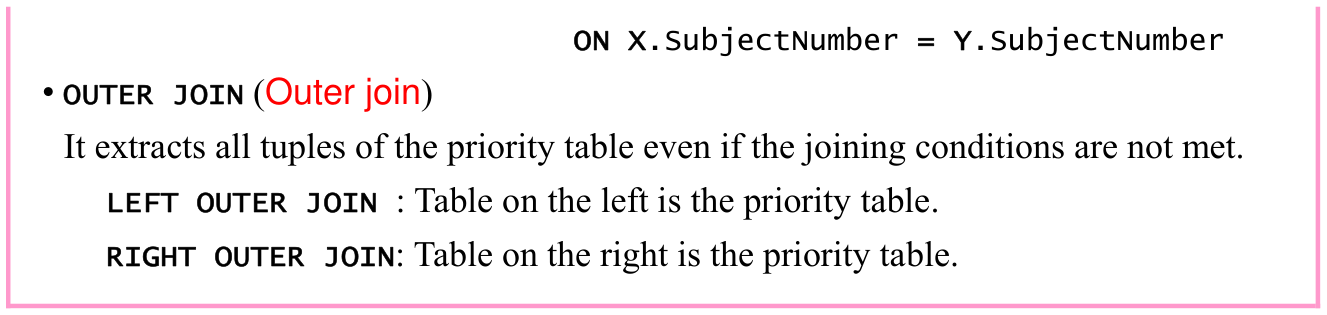
One of the methods of joining tables uses JOIN specification in the FROM clause. With JOIN specification, the following three joining operations can be achieved.
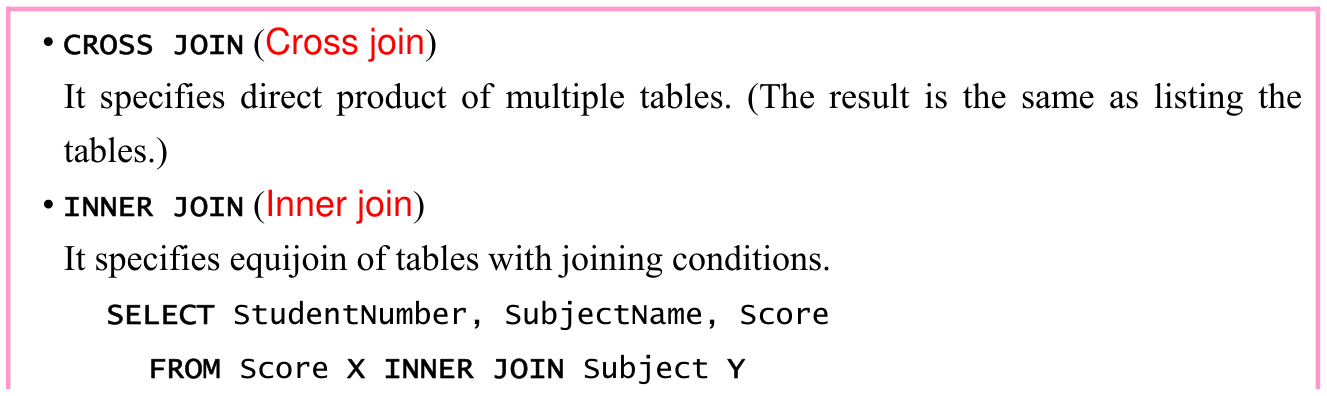
Original textbook table, example or syntax box, with its complete original layout. Source text: • CROSS JOIN (Cross join) It specifies direct product of multiple tables. (The result is the same as listing the tables.) • INNER JOIN (Inner join) It specifies equijoin of tables with joining conditions. SELECT StudentNumber, SubjectName, Score FROM Score X INNER JOIN Subject Y
p. 274 · Enlarge

p. 275

Original textbook table, example or syntax box, with its complete original layout. Source text: ON X.SubjectNumber = Y.SubjectNumber • OUTER JOIN (Outer join) It extracts all tuples of the priority table even if the joining conditions are not met. LEFT OUTER JOIN : Table on the left is the priority table. RIGHT OUTER JOIN: Table on the right is the priority table.
p. 275 · Enlarge

Section progress

Original chapter exercises

Original chapter exercises →

New FE Textbook Vol.1 · IT Fundamentals · First Edition, April 2015