Contents
Chapter 4 · DatabasePractice

LEARN WITH HARU

Video Lesson တွေက Haru အတန်းသားတွေအတွက်ပါ

Haru ရဲ့ ITPEC FE Full Course မှာ ယခု သင်ခန်းစာတွေကို တစ်ခုချင်း တစ်ကြောင်းချင်း အသေးစိတ်ရှင််ရှင်းပြထားပါတယ်

အခြေခံ မရှိတဲ့ ကျောင်းသားများစွာဟာလည်း ဒီ Course နဲ့ ပဲ အောင်မြင်ကုန်ကြပါပြီ

အတန်းမအပ်သေးပဲ Haru ဆီမှာ အစမ်းသင်ကြည့်ချင်ပါသလား?

သင်တန်းသားတွေရဲ့ စကားသံများ

သင်တန်းသားတွေရဲ့ စကားသံများ

Highlighted text? Practice this concept. Highlighted passages and figures open related questions.

Practice related questions (3)Progress & bookmarks

Current section

2-2-3 Grouping of Data

p. 270

Practice this section 3 linked exam questions with default filters

Progress

Not marked complete

Related questions in this lesson 4

COUNT and aggregate functions: original table continuation2Grouping rows and averaging scores1Filtering aggregate groups with HAVING1
Progress and bookmarks

p. 270

2-2-3 Grouping of Data

Grouping of data refers to handling the tuples where a certain attribute has the same value in a consolidated manner, and functions used for this are referred to as set functions (or aggregate functions). GROUP BY clause is used for grouping of data.
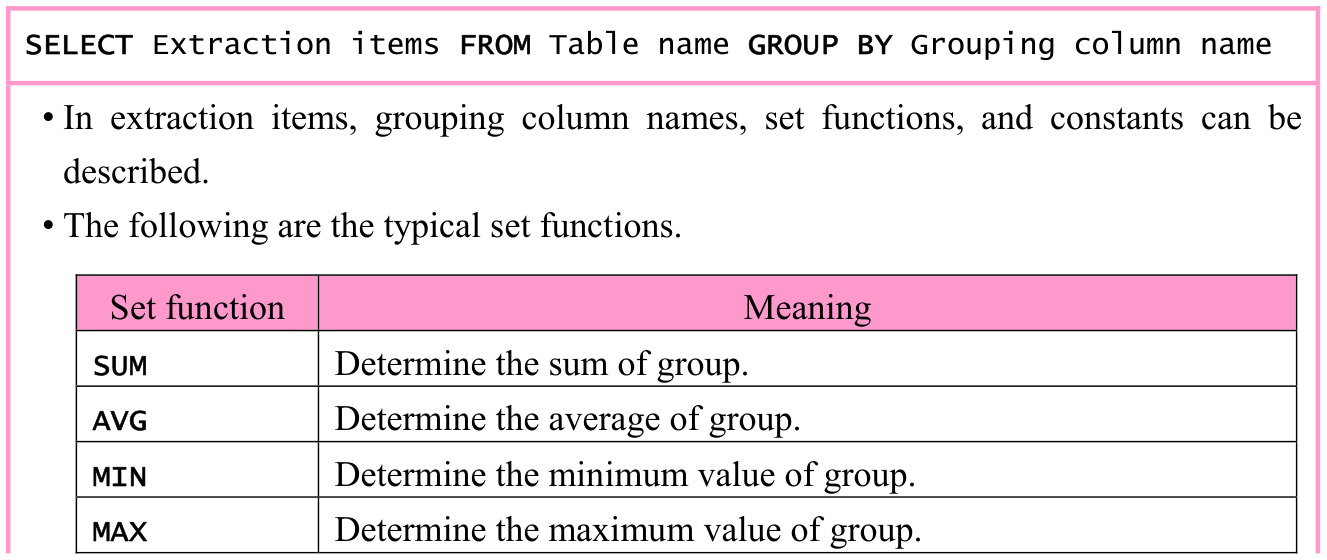
Original textbook table, example or syntax box, with its complete original layout. Source text: SELECT Extraction items FROM Table name GROUP BY Grouping column name • In extraction items, grouping column names, set functions, and constants can be described. • The following are the typical set functions. Set function Meaning Determine the sum of group. SUM Determine the average of group. AVG Determine the minimum value of group. MIN Determine the maximum value of group. MAX
p. 270 · Enlarge

p. 271

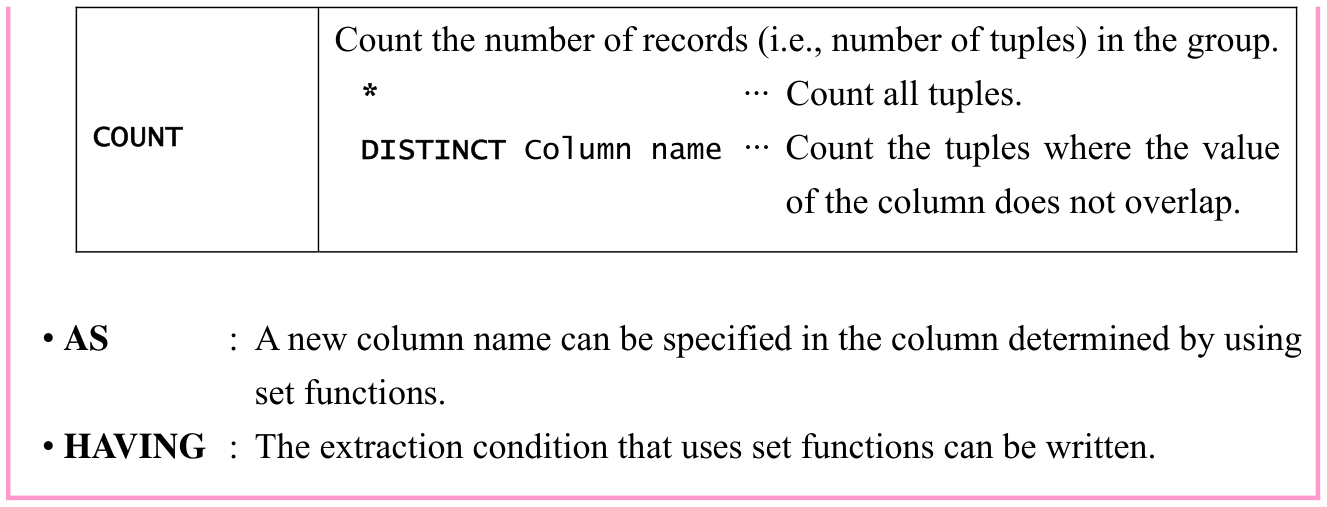
Original textbook table, example or syntax box, with its complete original layout. Source text: Count the number of records (i.e., number of tuples) in the group. * ··· Count all tuples. COUNT DISTINCT Column name ··· Count the tuples where the value of the column does not overlap. • AS : A new column name can be specified in the column determined by using set functions. • HAVING : The extraction condition that uses set functions can be written.
p. 271 · Enlarge
COUNT and aggregate functions: original table continuation · 2 practice questions

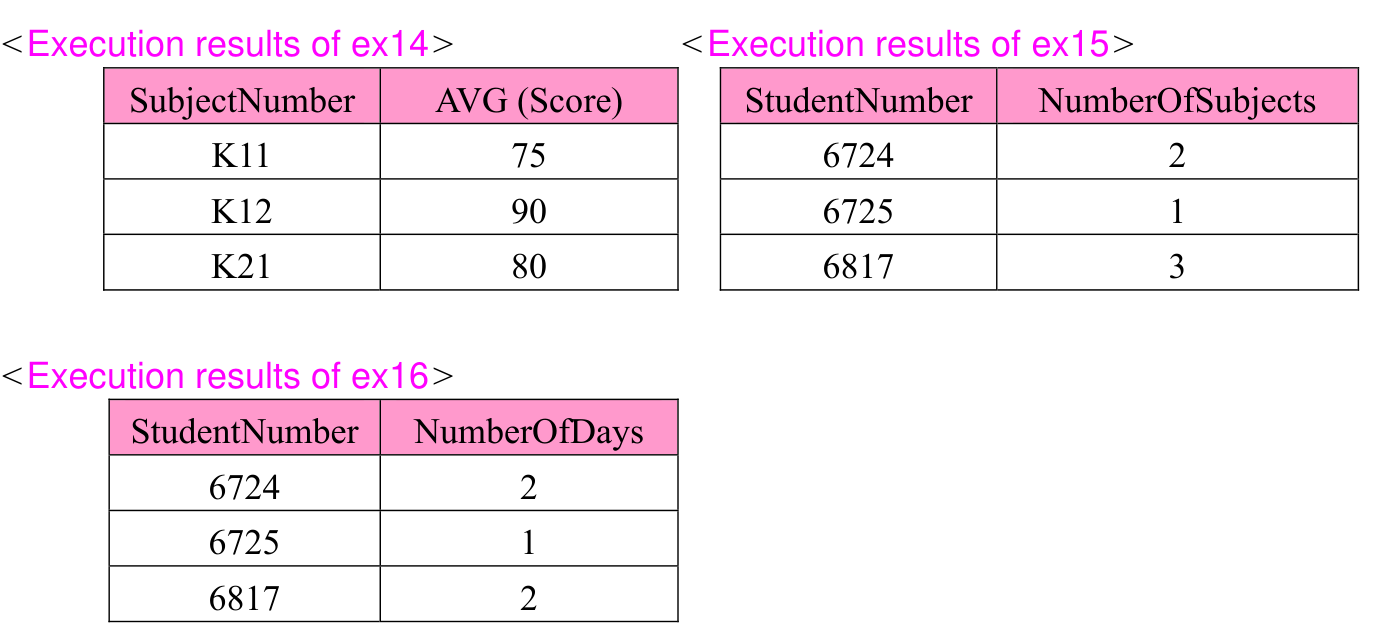
ex14: From the “Score” table, determine and extract average score of each subject.

Original SQL worked example with its complete source code, indentation, punctuation, source frame and any attached original notes. Source text: SELECT SubjectNumber, AVG(Score) FROM Score GROUP BY SubjectNumber
p. 271 · Enlarge
Grouping rows and averaging scores · 1 practice questions

ex15: From the “Score” table, determine and extract the number of subjects for which the respective student took an examination.

Original SQL worked example with its complete source code, indentation, punctuation, source frame and any attached original notes. Source text: SELECT StudentNumber, COUNT(*) AS NumberOfSubjects FROM Score GROUP BY StudentNumber
p. 271 · Enlarge

ex16: From the “Score” table, determine and extract the number of days for which the respective student took an examination.

Original SQL worked example with its complete source code, indentation, punctuation, source frame and any attached original notes. Source text: SELECT StudentNumber, COUNT(DISTINCT ExaminationDate) AS NumberOfDays FROM Score GROUP BY StudentNumber
p. 271 · Enlarge
Three original GROUP BY result tables: ex14 shows subject averages K11=75, K12=90, K21=80; ex15 shows examination subject counts by student; ex16 shows counts of distinct dates. Original captions, labels and every result row remain. Source text: <Execution results of ex14> <Execution results of ex15> SubjectNumber AVG (Score) StudentNumber NumberOfSubjects K11 75 6724 2 K12 90 6725 1 K21 80 6817 3 <Execution results of ex16> StudentNumber NumberOfDays 6724 2 6725 1 6817 2
p. 271 · Enlarge

p. 272

ex17: From the “Score” table, extract students having TotalScore (total of score) of 150 or more.
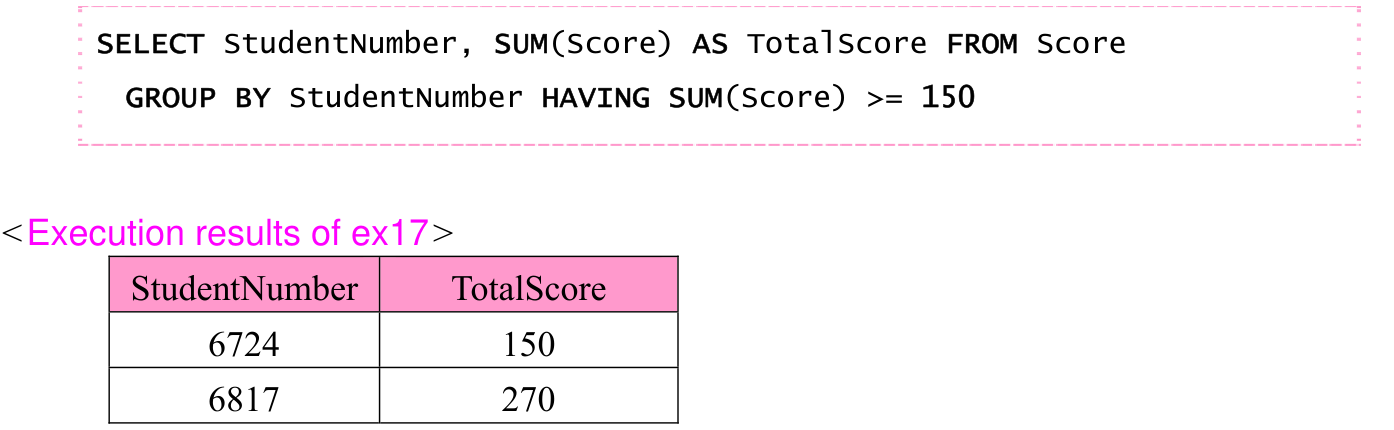
Original SUM/HAVING query and result: students 6724 and 6817 have TotalScore 150 and 270. The source condition SUM(Score) >= 150 and original captions are preserved. Source text: SELECT StudentNumber, SUM(Score) AS TotalScore FROM Score GROUP BY StudentNumber HAVING SUM(Score) >= 150 <Execution results of ex17> StudentNumber TotalScore 6724 150 6817 270
p. 272 · Enlarge
Filtering aggregate groups with HAVING · 1 practice questions

Original chapter exercises

Original chapter exercises →

New FE Textbook Vol.1 · IT Fundamentals · First Edition, April 2015