Contents
Chapter 4 · DatabasePractice

LEARN WITH HARU

Video Lesson တွေက Haru အတန်းသားတွေအတွက်ပါ

Haru ရဲ့ ITPEC FE Full Course မှာ ယခု သင်ခန်းစာတွေကို တစ်ခုချင်း တစ်ကြောင်းချင်း အသေးစိတ်ရှင််ရှင်းပြထားပါတယ်

အခြေခံ မရှိတဲ့ ကျောင်းသားများစွာဟာလည်း ဒီ Course နဲ့ ပဲ အောင်မြင်ကုန်ကြပါပြီ

အတန်းမအပ်သေးပဲ Haru ဆီမှာ အစမ်းသင်ကြည့်ချင်ပါသလား?

သင်တန်းသားတွေရဲ့ စကားသံများ

သင်တန်းသားတွေရဲ့ စကားသံများ

Highlighted text? Practice this concept. Highlighted passages and figures open related questions.

Practice related questions (1)Progress & bookmarks

Current section

2-2-2 Reference With Specifying Conditions

p. 268

Practice this section 1 linked exam question with default filters

Progress

Not marked complete

Related questions in this lesson 1

SQL LIKE wildcards1
Progress and bookmarks

p. 268

2-2-2 Reference With Specifying Conditions

Reference with specifying conditions corresponds to the relational operation “Selection” that extracts the tuples that satisfy the specified conditions. Use the following SELECT statement in reference with specifying conditions.
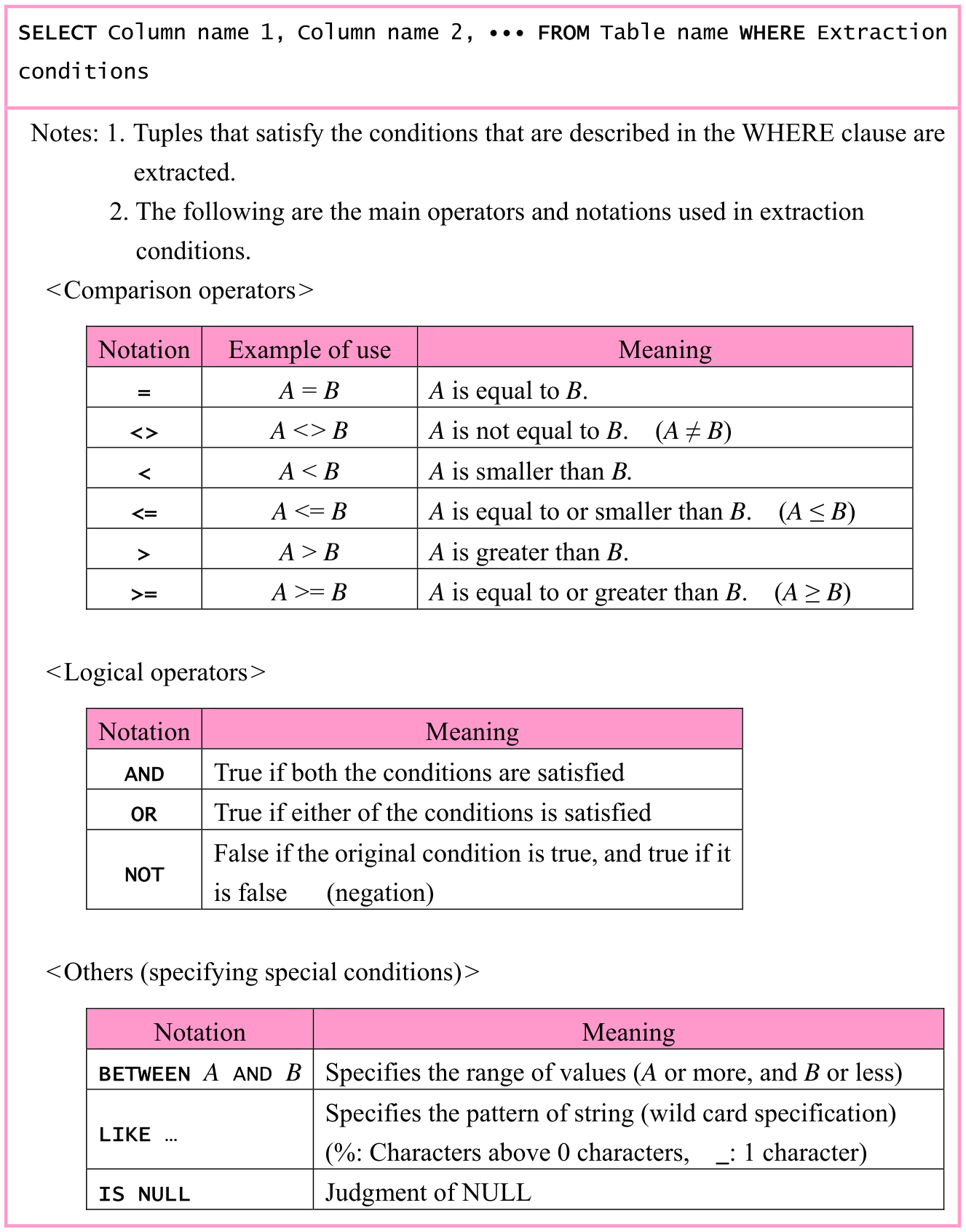
Original textbook table, example or syntax box, with its complete original layout. Source text: SELECT Column name 1, Column name 2, ∙∙∙ FROM Table name WHERE Extraction conditions Notes: 1. Tuples that satisfy the conditions that are described in the WHERE clause are extracted. 2. The following are the main operators and notations used in extraction conditions. <Comparison operators> Notation Example of use Meaning A = B A is equal to B. = A <> B A is not equal to B. (A ≠ B) <> A < B A is smaller than B. < A <= B A is equal to or smaller than B. (A ≤ B) <= > A > B A is greater than B. A >= B A is equal to or greater than B. (A ≥ B) >= <Logical operators> Notation Meaning True if both the conditions are satisfied AND True if either of the conditions is satisfied OR False if the original condition is true, and true if it NOT is false (negation) <Others (specifying special conditions)> Notation Meaning BETWEEN A AND B Specifies the range of values (A or more, and B or less) Specifies the pattern of string (wild card specification) LIKE … (%: Characters above 0 characters, _: 1 character) Judgment of NULL IS NULL
p. 268 · Enlarge
SQL LIKE wildcards · 1 practice questions

p. 269

ex09: From the “Student” table, extract tuples where Gender is 'Female' (Selection).

Original SQL worked example with its complete source code, indentation, punctuation, source frame and any attached original notes. Source text: SELECT * FROM Student WHERE Gender='Female'
p. 269 · Enlarge

ex10: From the “Subject” table, extract subject names other than the SubjectName 'Mathematics' (Selection, Projection).
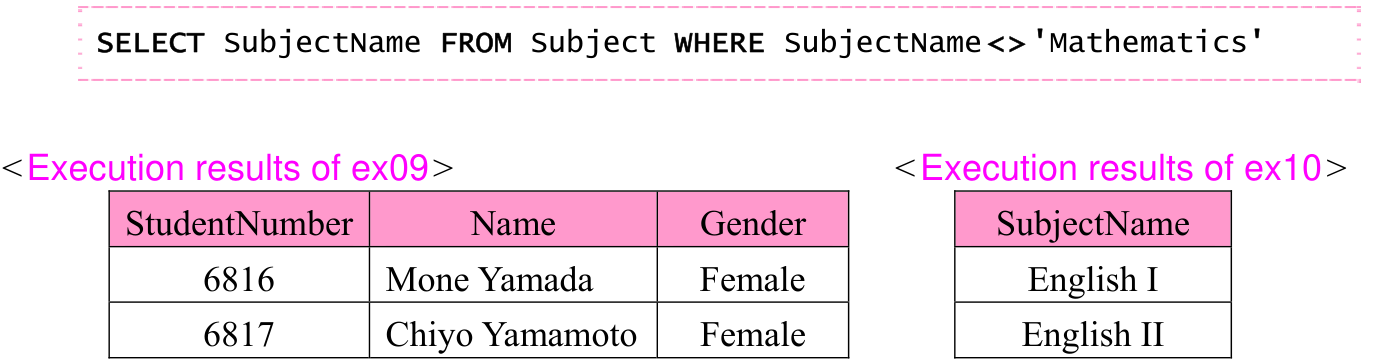
Original SQL execution-result assembly, including the original table labels, rows, columns and associated notes. Source text: SELECT SubjectName FROM Subject WHERE SubjectName<>'Mathematics' <Execution results of ex09> <Execution results of ex10> StudentNumber Name Gender SubjectName 6816 Mone Yamada Female English I 6817 Chiyo Yamamoto Female English II
p. 269 · Enlarge

ex11: From the “Score” table, extract StudentNumber, SubjectNumber, and Score where SubjectNumber contains '2' and Score is between 80 and 90.

Original SQL worked example with its complete source code, indentation, punctuation, source frame and any attached original notes. Source text: SELECT StudentNumber, SubjectNumber, Score FROM Score WHERE (SubjectNumber LIKE '%2%') AND (Score BETWEEN 80 AND 90)
p. 269 · Enlarge

ex12: From the “Score” table, extract StudentNumber, SubjectNumber, and Score where SubjectNumber contains '2' or Score is between 80 and 90.
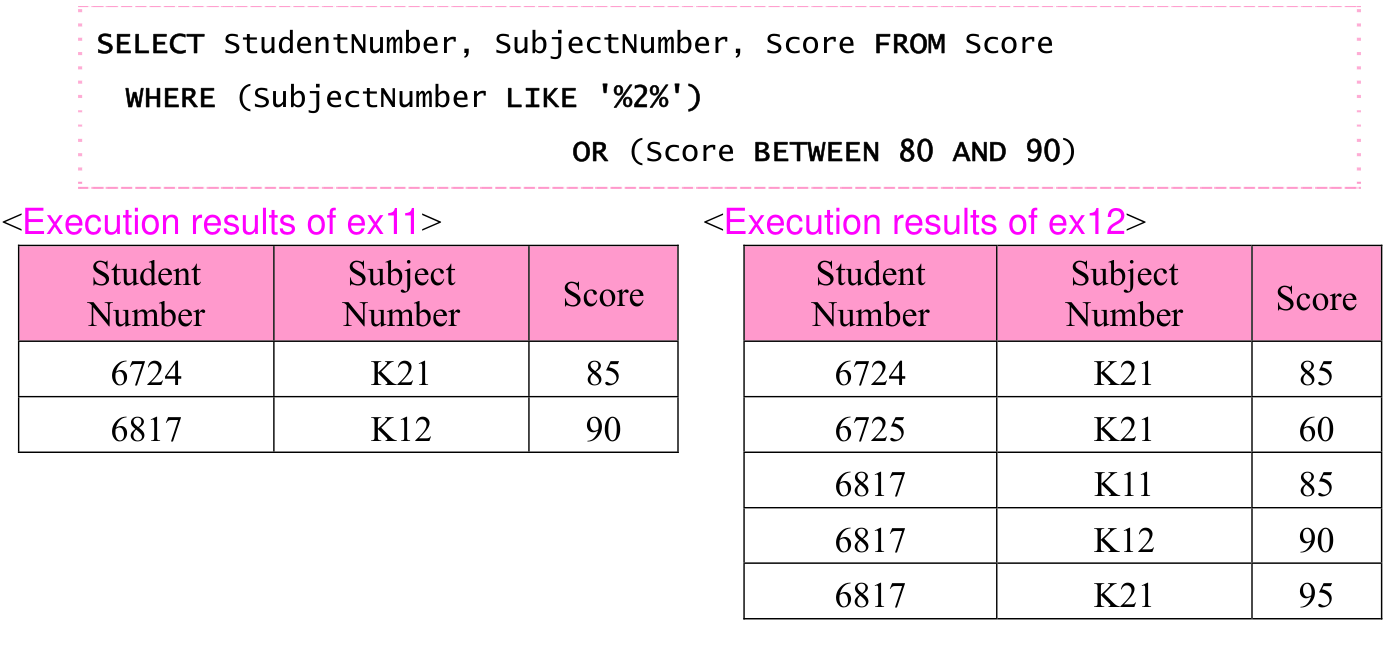
Original ex12 OR query plus side-by-side results for ex11 AND and ex12 OR. Ex11 has two rows: 6724/K21/85 and 6817/K12/90. Ex12 has five rows. The original WHERE, LIKE and BETWEEN notation, captions and all result cells are preserved. Source text: SELECT StudentNumber, SubjectNumber, Score FROM Score WHERE (SubjectNumber LIKE '%2%') OR (Score BETWEEN 80 AND 90) <Execution results of ex11> <Execution results of ex12> Student Subject Student Subject Score Score Number Number Number Number 6724 K21 85 6724 K21 85 6817 K12 90 6725 K21 60 6817 K11 85 6817 K12 90 6817 K21 95
p. 269 · Enlarge

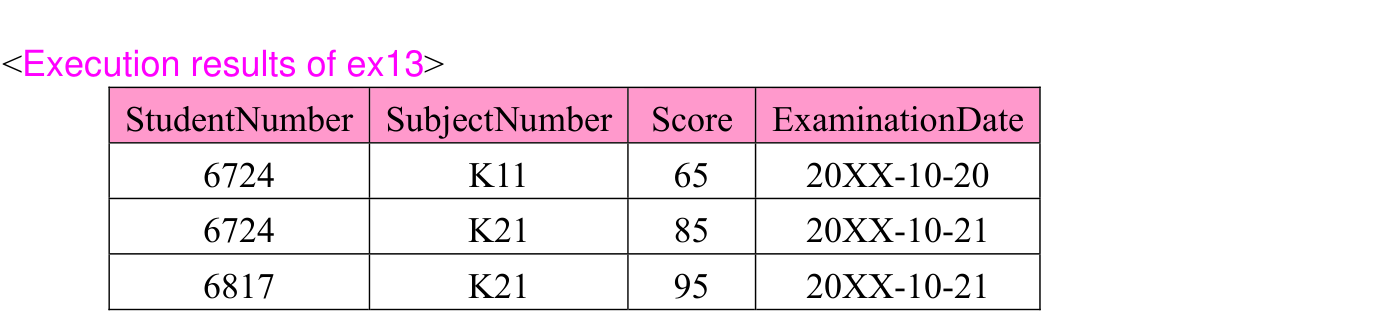
ex13: From the “Score” table, among the tuples where the score is greater than 60, extract the tuples where the 2nd digit as counted from the left edge of StudentNumber is '7' or ExaminationDate is '20XX-10-21'.

p. 270

Original SQL worked example with its complete source code, indentation, punctuation, source frame and any attached original notes. Source text: SELECT * FROM Score WHERE Score > 60 AND (StudentNumber LIKE '_7_ _' OR ExaminationDate = '20XX-10-21')
p. 270 · Enlarge
Original parenthesized AND/OR query result for ex13, with StudentNumber, SubjectNumber, Score and ExaminationDate columns and three source rows. Source text: <Execution results of ex13> StudentNumber SubjectNumber Score ExaminationDate 6724 K11 65 20XX-10-20 6724 K21 85 20XX-10-21 6817 K21 95 20XX-10-21
p. 270 · Enlarge

Note: If ( ) is not included, AND is evaluated first, and incorrect results are extracted as shown below.
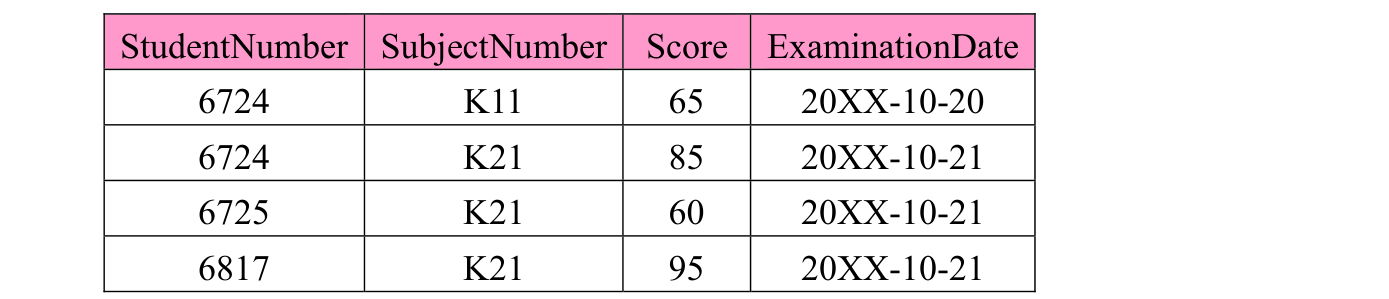
Original four-row comparison table showing the different result when parentheses are omitted. All source columns and dates remain aligned; the preceding explanation remains selectable. Source text: StudentNumber SubjectNumber Score ExaminationDate 6724 K11 65 20XX-10-20 6724 K21 85 20XX-10-21 6725 K21 60 20XX-10-21 6817 K21 95 20XX-10-21
p. 270 · Enlarge

Section progress

Original chapter exercises

Original chapter exercises →

New FE Textbook Vol.1 · IT Fundamentals · First Edition, April 2015