Highlighted text? Practice this concept. Highlighted passages and figures open related questions.
Practice related questions (1)Progress & bookmarks
Current section
4-2 Interface Design
p. 157
Practice this section 1 linked exam question with default filters
Progress
Not marked complete
Related questions in this lesson 2
Logical validity checking2p. 157
4 - 2 Interface Design
4-2-1 Screen Design and Form Design
(1) Screen design
Screen design refers to designing the content and layout to be displayed on the screen. During the interface design of the screen, the “Shneiderman’s Eight Golden Rules” are used very often.
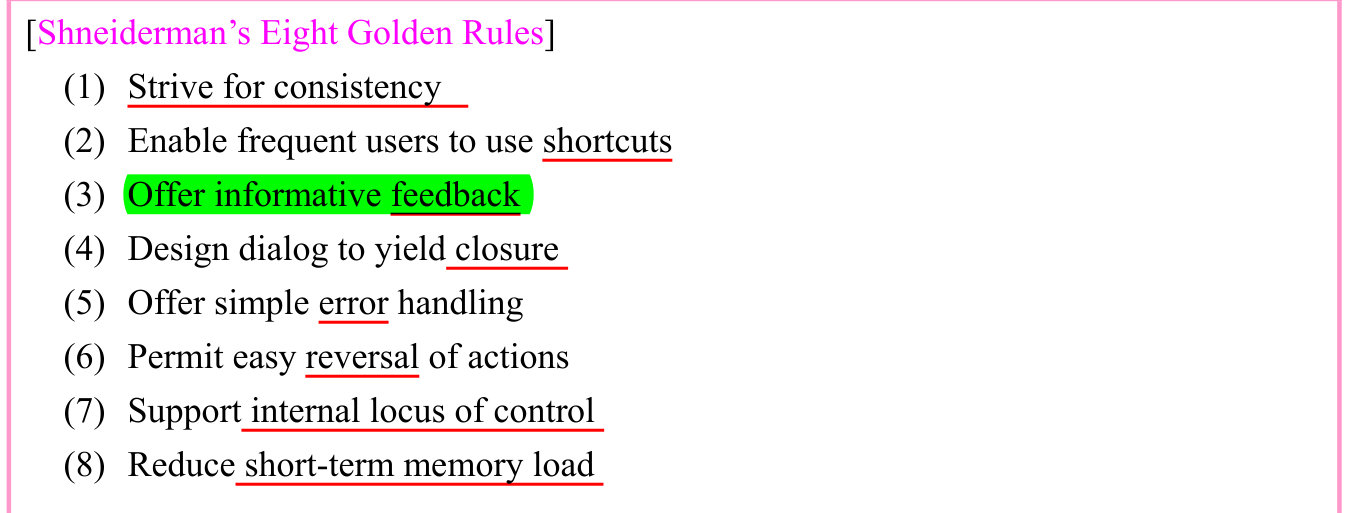
In addition to the “Shneiderman’s Eight Golden Rules,” it is necessary to give consideration
p. 158
to the screen layout and the information relationship displayed on the screen, in order to perform screen design.
[Points to be considered in screen design]
- • Unify the display position of the titles and messages on the screen so as to
standardize the screen layout (also standardize how to use the function keys.) ··· (1) - • Standardize the display location of error messages, but do not standardize the content
(help to understand the cause of an error and the appropriate coping technique.) ··· (5) - • Arrange the reference items from left to right and from top to bottom. Also pay
attention to the format of the original entry sheet, and arrange related items adjacent to each other. - • Enclose the items entered on the screen within blank box or brackets to emphasize
the fact that these are input locations. - • Examine the use of the most appropriate GUI tools when data is entered on the
screen. In addition to stepwise selection for beginners through the menu, enable direct selection using shortcut keys for skilled persons. ··· (2) - • Display the progress status during processing through a progress bar so as to notify
the user about the proper operation of the system. ··· (4) - • Provide the Undo function to enable return to the previous status. ··· (6)
Also, it is necessary to give consideration to foolproof in the design of the input screen and examine the methods for input check of the data. The following are typical methods of an input check:
- • Numeric check
This ensures that data other than numeric values is not entered in numeric value items. - • Limit check
This makes sure that a numeric value falls within the specified range. - • Format check
This ensures that the data is in the specified format. - • Duplication check
This ensures that the same data is not duplicated. - • Matching check
This collates the data with the master file to ensure that the data is correct. - • Balance check
This ensures that the separately tabulated totals are consistent with one another. - • Logical check (Validity check)
This ensures that the data is logically correct. · 2 questions
p. 159
- • Sequence check
This ensures that the numbers are arranged in a sequence (and no number is missing). - • Combination check
This ensures that there is no contradiction in the combination of several related items that have been entered. - • Check digit check
This uses the check character to inspect the input data.
(2) Form design
Form design is used to design the items and layout of the forms (e.g., reports) to be generated from the system. The basic procedure of form design is as follows:
- 1) Comprehensive consideration
This process includes comprehensive consideration for the output purpose of the forms, output cycle (time period), output timing, distribution list, output volume (generated amount), and so on. - 2) Decision concerning the output method and output medium
This process decides the most appropriate output method and output medium on the basis of the comprehensive consideration. In addition to paper, writing to CD and screen display are considered as the output media. - 3) Creation of output items and form layout
This process considers the necessary output items and arranges them in an easy-to-understand manner on the forms. At this time, it registers the document model (e.g., borders and ruled lines) in the printer, and also considers the use of form overlay where data is superimposed and printed.
Section progress
Original chapter exercises
Original chapter exercises →New FE Textbook Vol.1 · IT Fundamentals · First Edition, April 2015