Learning toolsProgress & bookmarks
Current section
4-2-3 Human Interface Techniques
p. 162
Progress
Not marked complete
p. 162
4-2-3 Human Interface Techniques
(1) Web design
Web design refers to designing of a web page or website used on WWW (World Wide Web), which is a mechanism of transmitting information on the Internet.
(a) Web usability It is the “ease of use” of a web page or website. The column “Alertbox” by Jakob Nielsen, Ph.D. may be referenced with regard to web usability. In this regard, the following are cited as the five quality components of web usability:
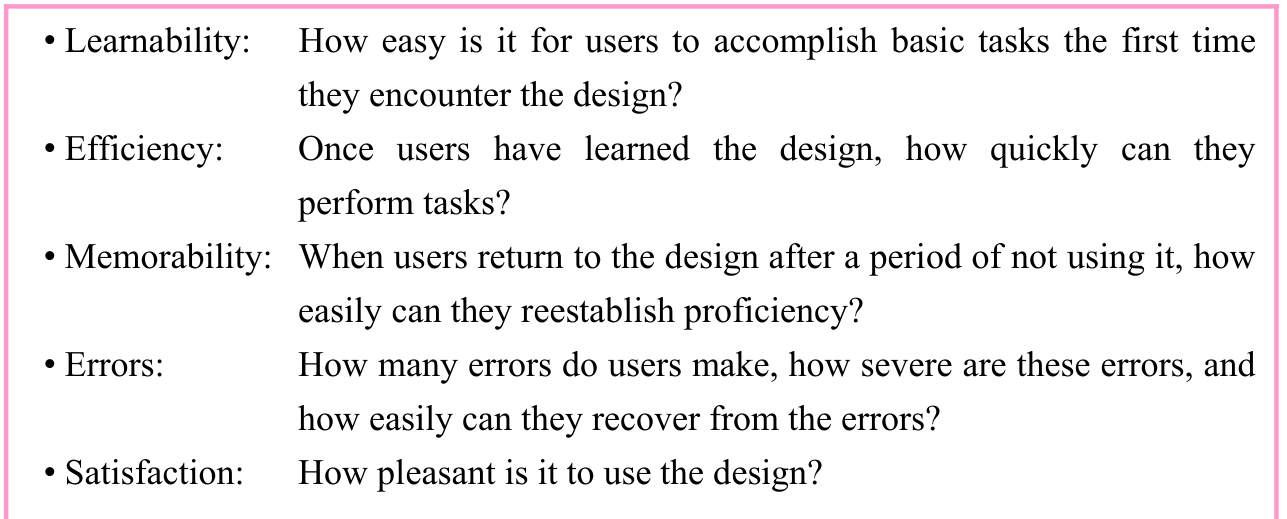
p. 163
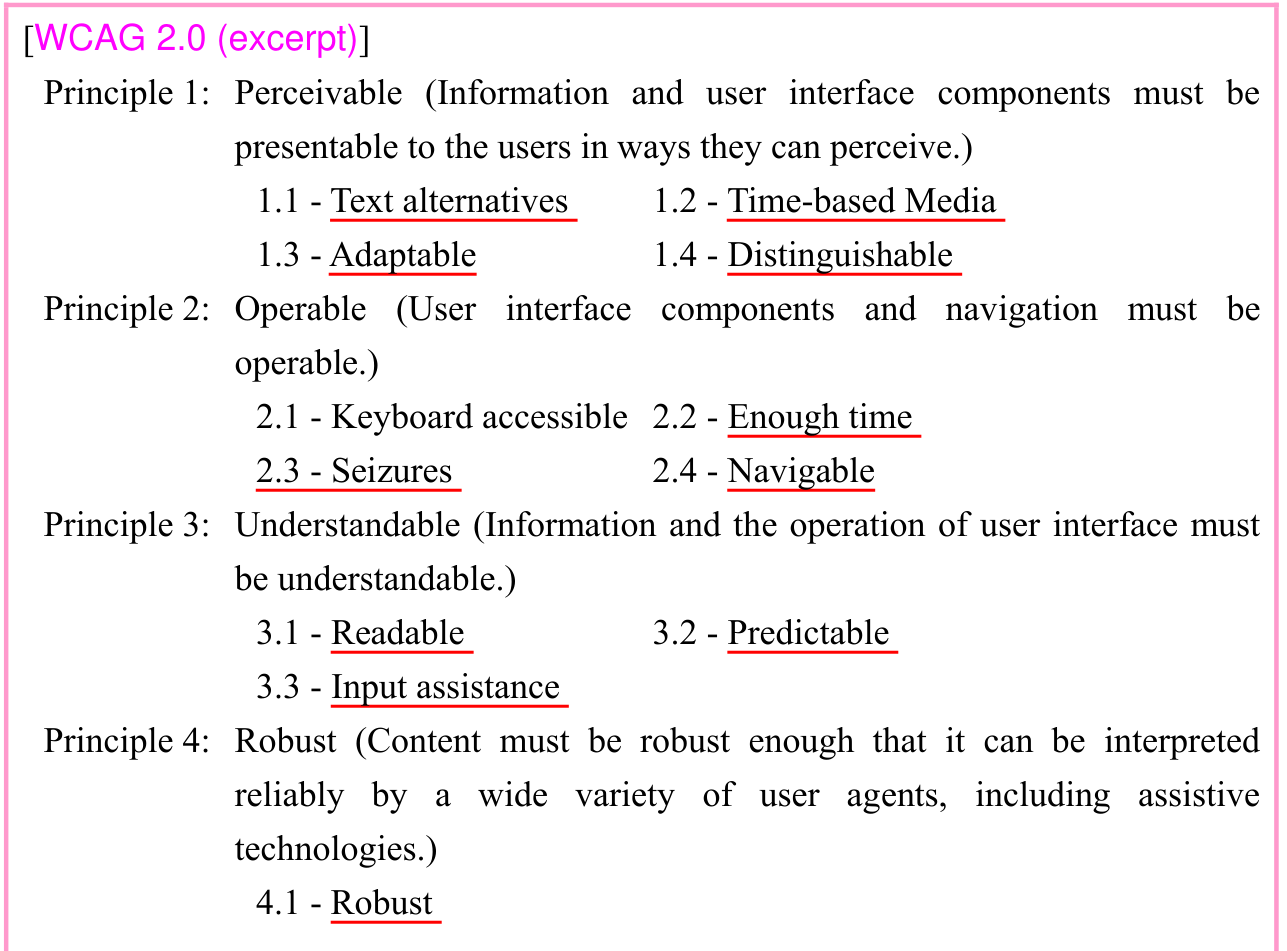
(b) Web accessibility It is the “ease of accessing” a web page or website. Concerning web accessibility, W3C (WWW Consortium), which performs standardization of WWW recommends the following WCAG 2.0 (Web Content Accessibility Guidelines 2.0).
(c) Style sheet It is a sheet that defines the document structure of a web page and decorative information (e.g., frame, font size, and line spacing) of a document. A web page is created by using HTML (HyperText Markup Language: Descriptive language for the web page). CSS (Cascading Style Sheets) are style sheets that can define the layout of a web page independent of HTML. By using a style sheet, it is possible to create a standardized website by only providing the information to be put up on the web page through a predetermined procedure. Although CSS is interpreted at the browser side, the operation may differ depending on the browser even for the same code. Therefore, a cross browser and progressive enhancement are used.
- • Frame
It is a presentation technique that the web page to be displayed is divided into several parts. It also represents decorative designs such as ornamental lines and ruled lines that are added to each frame.- • Cross browser
- • Cross browser
p. 164
It is a technique of eliminating differences in operation depending on browser specifications so that the website and web applications operate normally. By performing a different process in each browser, the execution of a different operation by the same code is avoided.
- • Progressive enhancement
It is a concept of web design that the basic information is transmitted regardless of the PC environment, and an attempt is made to provide a rich experience to users who are using a high-function browser. It emphasizes the fact that information is transmitted accurately regardless of the browsing environment (i.e., browser), on the basis of a three-layer structure including “a logical structure that the text content is transmitted with authenticity,” “visual design control,” and “site behavior control.”
(d) Navigation Navigation in a website refers to a mechanism that enables fast and accurate access to the desired information (i.e., web page) on the site. The typical navigation used in a website includes the following:
- • Site map
It is a mechanism that enables fast search of the desired information by hierarchically displaying the labels added for understanding the information of web pages.- • In-site search
It is a function that displays the relevant web page or the location within a web page when the search keyword is entered. It includes the full text search that targets the entire text and the index search that searches for the registered keyword.
- • In-site search
(2) Human-centered design
Human-centered design is an approach to interactive system development that focuses specifically on making systems usable. It is established as ISO 13407 and translated as JIS Z 8530 (In 2010, IS0 13407 was integrated into ISO 9241 as ISO 9241-210.) In ISO 13407 (JIS Z 8530), four characteristics are provided as the principles of human-centered design.
p. 165
[Principles of human-centered design] a) The active involvement of users and a clear understanding of user and task requirements b) An appropriate allocation of function between users and technology c) Iteration of design solutions d) Multi-disciplinary design
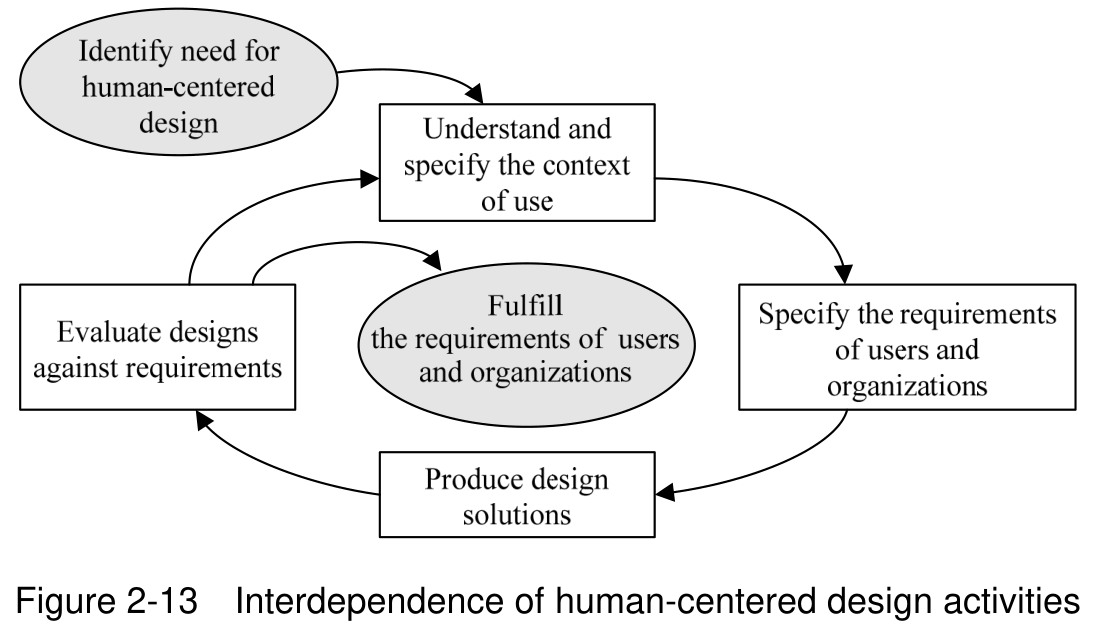
Moreover, four processes are cited as human-centered design activities based on these principles. As shown in Figure 2-13, it is desirable that these human-centered design activities (i.e., processes) be started from an early stage of information processing system development and executed repeatedly until the requirements are fulfilled.
[Human-centered design activities] a) Understand and specify the context of use b) Specify the requirements of users and organizations c) Produce design solutions d) Evaluate designs against requirements
(3) Universal design
A universal design refers to a design that provides comfortable and easy-to-use environments and services to all persons regardless of the existence of differences in the age, culture, ability, and disabilities. The “Seven Principles of Universal Design” proposed by Dr. Ron Mace are frequently used to achieve universal designs.
p. 166
[Seven principles of universal design] (1) Equitable use: The design is useful and marketable to people with diverse abilities. (2) Flexibility in use: The design accommodates a wide range of individual preferences and abilities. (3) Simple and intuitive use: Use of the design is easy to understand, regardless of the user’s experience, knowledge, language skills, or current concentration level. (4) Perceptible information: The design communicates necessary information effectively to the user, regardless of ambient conditions or the user’s sensory abilities. (5) Tolerance for error: The design minimizes hazards and the adverse consequences of accidental or unintended actions. (6) Low physical effort: The design can be used efficiently and comfortably and with a minimum of fatigue. (7) Size and space for approach and use: Appropriate size and space is provided for approach, reach, manipulation, and use, regardless of user’s body size, posture, or mobility.
Moreover, there are some more policies of universal design. WCAG 1.0 (1995) and WCAG 2.0 (2008) are compiled as guidelines for enabling access (i.e., setting in a high accessibility status) to web content particularly for persons with disabilities by an internal organization of W3C, WAI (Web Accessibility Initiative). WAI-ARIA (Web Accessibility Initiative-Accessible Rich Internet Applications) is also provided as specifications for accessibility of dynamic web content using video and sound.
The universal design is used to pursue not just ease-of-use (i.e., usability) but also ease-of-access (i.e., accessibility) by any person. For example, mechanisms are prepared for changing the font size and color for visually impaired people and enabling voice input for persons who cannot use the mouse because of being unable to use their hands. Although the universal design is meant for all persons, there is another concept called information barrier free that targets elderly persons and persons with disabilities. While universal design is a concept that an obstacle-free environment is designed or provided right from the beginning, information barrier free is a concept that an information communication environment that does not have (is free of) any obstacles is provided by eliminating the obstructions (i.e., barriers) for elderly persons or persons with disabilities. The concept of information barrier free is stipulated in JIS X 8341 (Guidelines for elderly persons and persons with disabilities — Information and communications equipment, software, and services —).
Section progress
Original chapter exercises
Original chapter exercises →New FE Textbook Vol.1 · IT Fundamentals · First Edition, April 2015