Highlighted text? Practice this concept. Highlighted passages and figures open related questions.
Practice related questions (1)Progress & bookmarks
Current section
2-2-2 Binary Search
p. 421
Progress
Not marked complete
Related questions in this lesson 1
Binary search and sorted data1p. 421 · PDF 431
2-2-2 Binary Search

Original source text
1
2
3
4
5
6
7
8
9
T
12
28
34
45
57
60
71
83
96
X
Source visual description
Original Binary Search source layout. Source labels: 1; 2; 3; 4; 5.
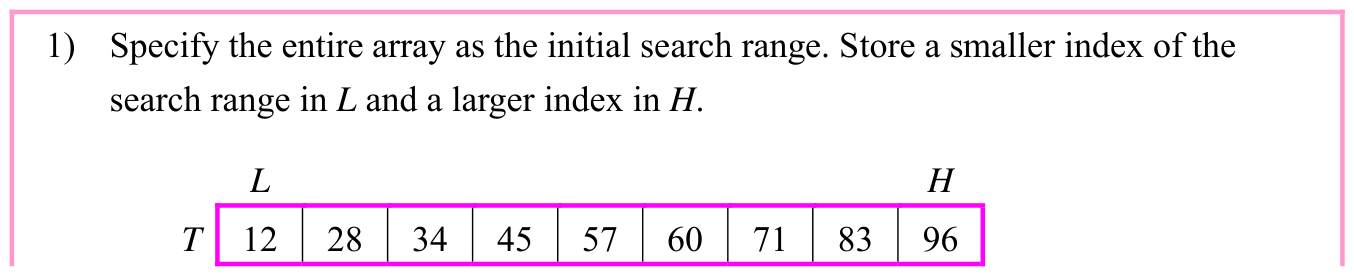
When 34 is entered as target value X, the search procedure is as follows:
Original source text
1) Specify the entire array as the initial search range. Store a smaller index of the
search range in L and a larger index in H.
L
H
T
12
28
34
45
57
60
71
83
96
Source visual description
Original Binary Search source layout. Source labels: 1) Specify the entire array as the initial search range. Store a smaller index of the; search range in L and a larger index in H.; L; H; T.
p. 422 · PDF 432
Original source text
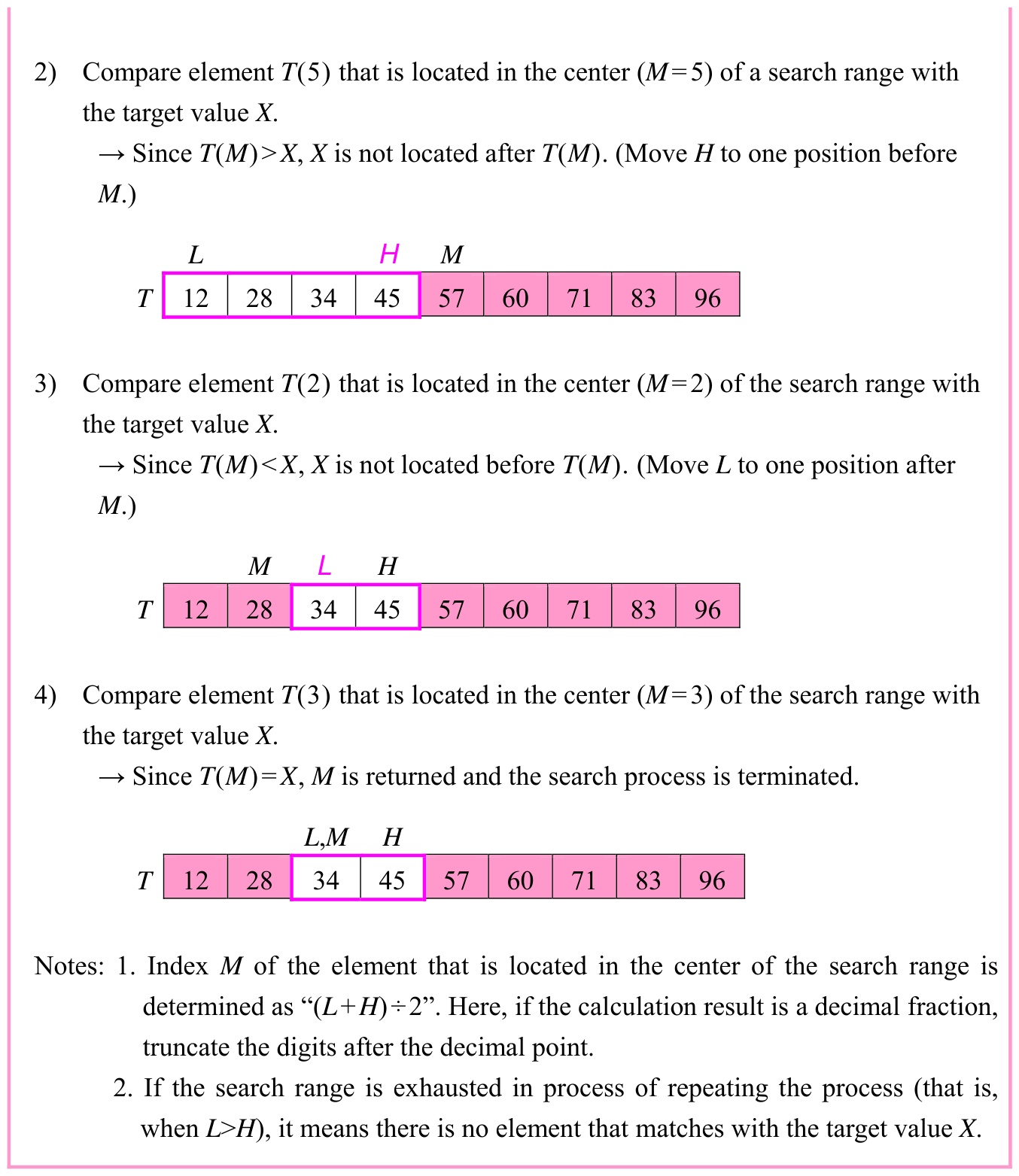
2) Compare element T(5) that is located in the center (M=5) of a search range with
the target value X.
→ Since T(M)>X, X is not located after T(M). (Move H to one position before
M.)
L
H
M
T
12
28
34
45
57
60
71
83
96
3) Compare element T(2) that is located in the center (M=2) of the search range with
the target value X.
→ Since T(M)<X, X is not located before T(M). (Move L to one position after
M.)
M
L
H
T
12
28
34
45
57
60
71
83
96
4) Compare element T(3) that is located in the center (M=3) of the search range with
the target value X.
→ Since T(M)=X, M is returned and the search process is terminated.
L,M
H
T
12
28
34
45
57
60
71
83
96
Notes: 1. Index M of the element that is located in the center of the search range is
determined as “(L+H)÷2”. Here, if the calculation result is a decimal fraction,
truncate the digits after the decimal point.
2. If the search range is exhausted in process of repeating the process (that is,
when L>H), it means there is no element that matches with the target value X.
Source visual description
Original Binary Search source layout. Source labels: 2) Compare element T(5) that is located in the center (M=5) of a search range with; the target value X.; → Since T(M)>X, X is not located after T(M). (Move H to one position before; M.); L.
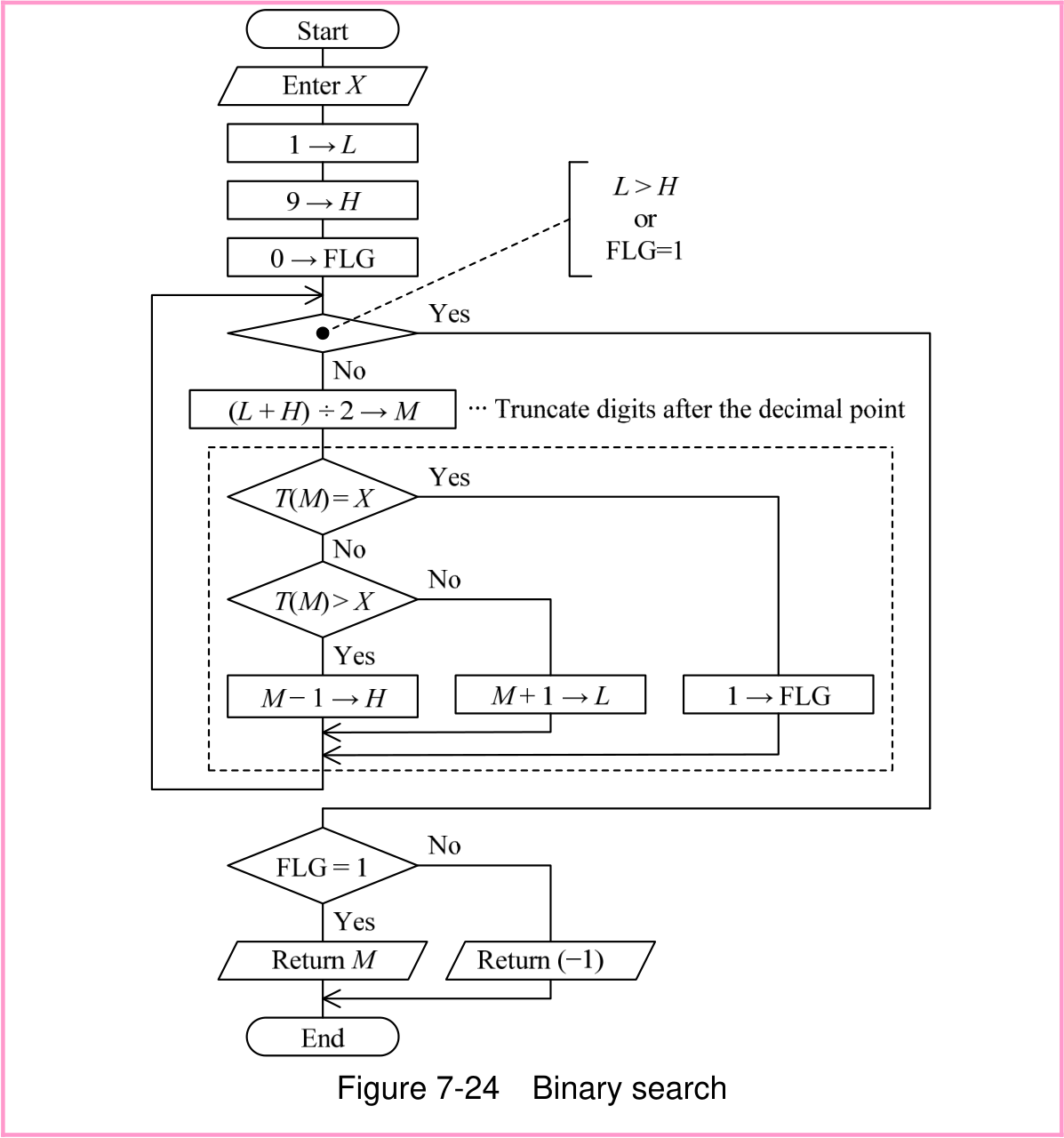
A flowchart based on this concept is shown in Figure 7-24. In this flowchart, the state during the search is checked with the value of variable FLG (0: Not found, 1: Found). (A variable that represents the state is called a flag.) The nested structure part that is covered with a dotted line can be rewritten with CASE selection.
p. 423 · PDF 433
Original source text
Figure 7-24 Binary search
Source visual description
The original binary-search chart retains L, H, M and FLG, the stated truncation of fractional digits and its return branches.
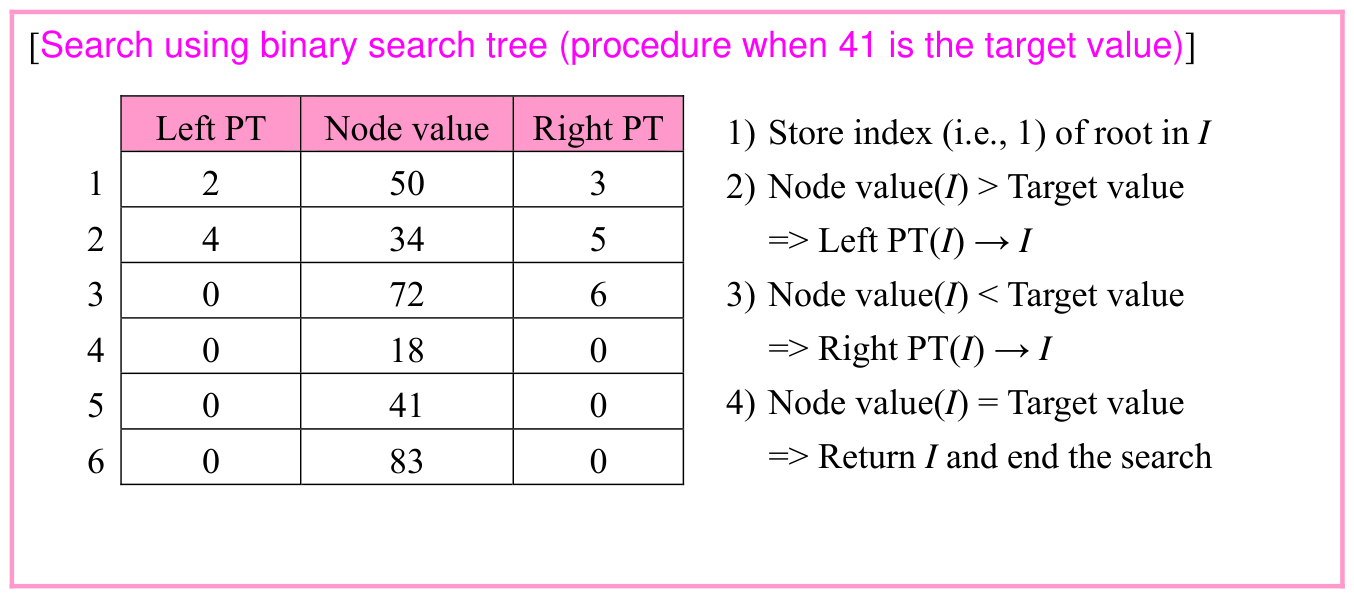
A search that uses a binary search tree can also be called a type of binary search. In a binary search tree, “Left subtree < Node < Right subtree” holds true in all nodes. Therefore, the next node to be searched for is decided according to the magnitude relation between the node value and the target value.
p. 424 · PDF 434
Original source text
[Search using binary search tree (procedure when 41 is the target value)]
Left PT
Node value
Right PT
1) Store index (i.e., 1) of root in I
1
2
50
3
2) Node value(I) > Target value
2
4
34
5
=> Left PT(I) → I
3
0
72
6
3) Node value(I) < Target value
4
0
18
0
=> Right PT(I) → I
5
0
41
0
4) Node value(I) = Target value
=> Return I and end the search
6
0
83
0
Source visual description
Original Binary Search source layout. Source labels: [Search using binary search tree (procedure when 41 is the target value)]; Left PT; Node value; Right PT; 1) Store index (i.e., 1) of root in I.
Section progress
Original chapter exercises
Original chapter exercises →New FE Textbook Vol.1 · IT Fundamentals · First Edition, April 2015